Start here
How to Sell Digital Products Online for Free Without Shopify
Facts checked
Short answer
You can sell digital products without Shopify by using Systeme.io: create a funnel with an order page, set the offer type to Digital product, add a price plan, connect Stripe or PayPal, and send the file by an automatic email after each sale. Systeme.io charges 0% transaction fees on every plan, and the free plan lets you start without paying. You only pay your payment provider's fee.
Key facts
- Cost to start
- $0 on the free plan
- Transaction fees
- 0% on every plan
- Payment processors listed
- Stripe, PayPal, Razorpay, Flutterwave, Xendit, Apple Pay, MercadoPago
- Funnels on the free plan
- 3
- File storage
- Listed as unlimited on all plans
- Email attachment limit
- 5 MB (use a download link for bigger files)
Some links are affiliate links: if you upgrade to a paid plan, I may earn a commission at no extra cost to you.
Can you sell digital products without Shopify?
Yes. A digital product is just a file someone pays for: an ebook, a template, a PDF or a training. You do not need a store platform for that. In Systeme.io you build one funnel with an order page, set a price, connect your payment provider and let an automatic email deliver the file.
I use Systeme.io for my own business and show beginners how to start on my YouTube channel. The free plan is the way I would test a product idea: you can try the whole setup before spending anything.
What you need
| You need | Where it lives in Systeme.io |
|---|---|
| A page that sells the product | A funnel page from a template |
| A checkout | The funnel's order page |
| A way to get paid | Stripe, PayPal or another listed processor |
| Delivery of the file | An automation rule that sends an email |
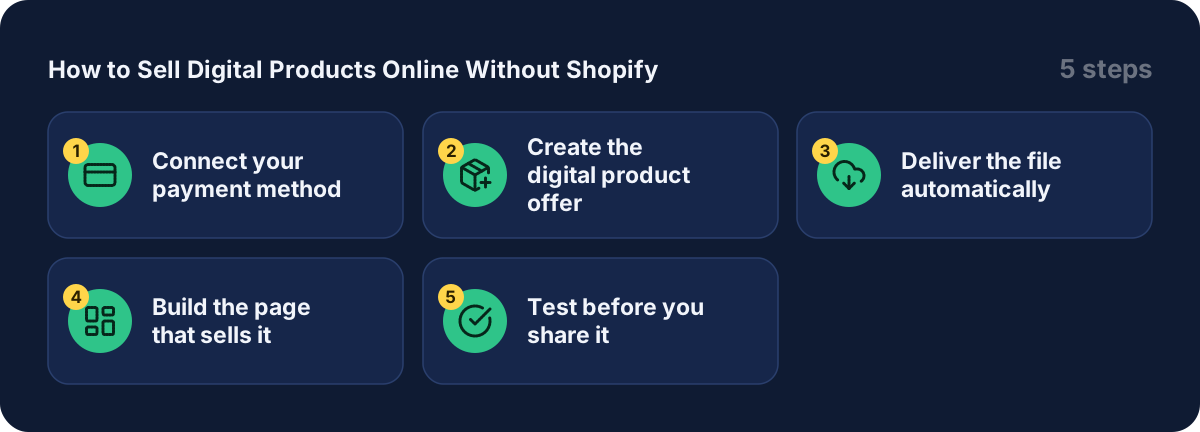
Step 1: Connect your payment method
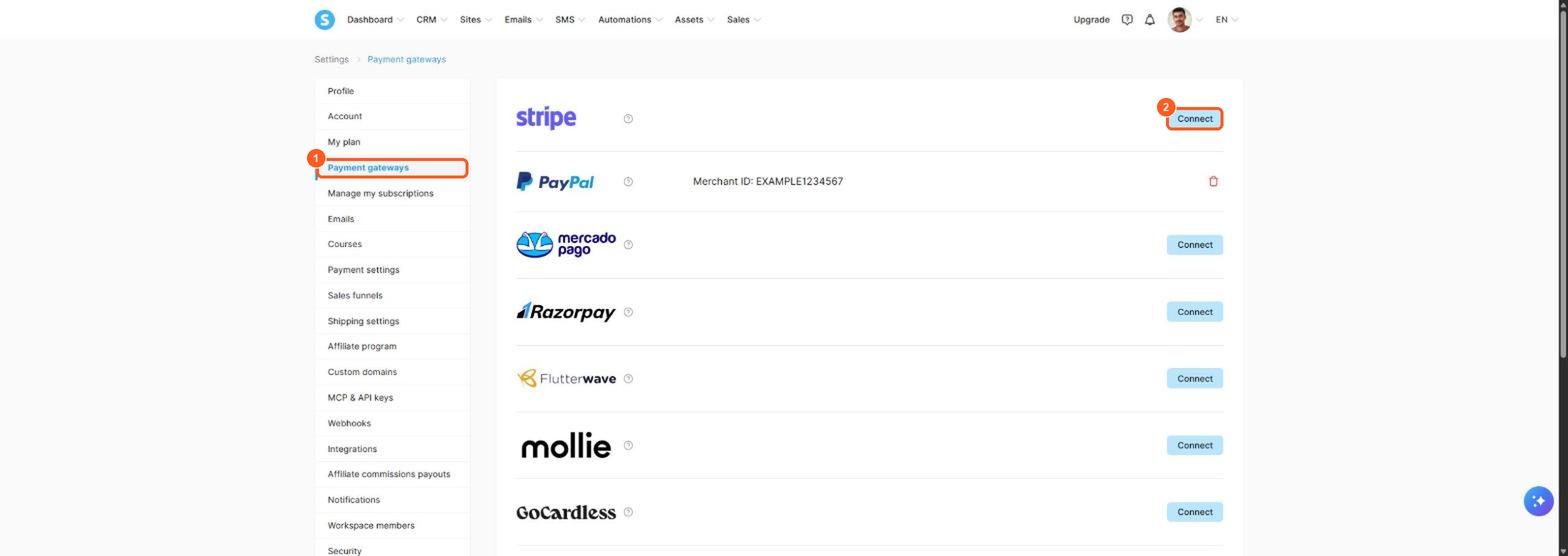
The orange numbers show what to click, in the same order as the steps.
- Click your profile picture at the top right, then Settings.
- In the left menu, click Payment gateways.
- Next to Stripe, click Connect and follow the steps. Connect PayPal the same way if you want it.
The pricing page lists Stripe, PayPal, Razorpay, Flutterwave, Xendit, Apple Pay and MercadoPago, so pick the one that works in your country.
Step 2: Create the digital product offer
These steps follow the official help article for selling an ebook.
- Open Sites → Funnels, then open your funnel and click the payment page (the Order form step).
- Under Choose offer type, pick Digital product.
- Click the + icon to create a new digital product and give it a name in the Digital Product Name field.
- Click the + icon to add a resource to the offer, choose Tags and save. This tag marks every buyer.
- Add a price. Under Price plans, click +, choose a one-time payment or a subscription, name it and type the amount. The help article notes you must create a price plan too.
Step 3: Deliver the file automatically
- Create an automation rule with the trigger New sale, for your offer.
- Add the action Send email.
- Write the email and attach your file. The help article gives 5 MB as the maximum attachment size.
- Save the rule. Every buyer now gets a tag and an email with the file.

The orange arrow shows where to click.
If the file is bigger than 5 MB, upload it to cloud storage such as Google Drive, OneDrive or Dropbox and paste the link into the email. The help article also lists a direct download link on the thank-you page as another option.
Step 4: Build the page that sells it
Pick a template from the template library, replace the text and pictures with yours, and keep one offer and one button on the page. Say what the buyer gets, in plain words, and show the price.
Step 5: Test before you share it
Buy your own product once, using the payment method you connected, and check that the email arrives with the file. Fix anything before real customers find it.
What about Shopify?
Shopify is built for online stores that ship products. For a few digital files, a funnel with an order page is simpler. If you want a detailed side-by-side, read my Systeme.io vs Shopify comparison. If you sell physical goods, check the current Systeme.io help pages first, because I have not confirmed physical product support.
Best platforms to sell digital products online: marketplaces vs your own store
There are two ways to sell digital products online. You can list them on a marketplace, or you can sell from your own website. Which one is the best platform for you depends on what you want to sell and how much control you want.
| Option | How it works | Trade-off |
|---|---|---|
| Marketplace like Etsy | You list a digital download in a shared store where buyers already browse | Easy to start, but you share the space with many sellers and pay the marketplace's own fees |
| Your own store on a platform like Systeme.io | You build a product page, an order form and a checkout under your own brand | You need to bring your own visitors, but you keep the customer list |
A marketplace gives you built-in traffic. Your own store gives you your email list, and that list is what lets you sell again. Platform fees differ from site to site, so check each platform's current fee page before you decide. On Systeme.io the pricing page lists 0% transaction fees, though your payment processor still charges its own fees.
What digital products can you sell?
Digital products are files or access that you deliver online, so there is nothing to ship. This is what separates them from physical products, which need storage and delivery. Popular digital products to sell include:
- Digital downloads such as printables, checklists, planners and presets
- Ebooks and guides, which I cover in my guide to selling ebooks online
- Templates, for example for Canva or Notion
- Online courses and video lessons
- Digital art and design files
- Memberships that give paid access to content
Pick one product you can finish this week. A small, clear product sells more easily than a big one that never launches.
How to sell your digital products with Systeme.io
This is the short version of the steps in this guide:
- Create the digital product and upload the file.
- Set a price plan, either a one-time payment or a subscription.
- Build a product page and an order form in a funnel.
- Add an email campaign so buyers get the download and a follow-up.
- Send visitors to the page from your blog, social media or an email list.
If you do not have a visitor source yet, start with the email list. My guide on building a sales funnel from scratch and my guide to creating a lead magnet show how to collect your first subscribers. You can try all of this on the free plan, which means no free-trial clock is running. Check the Systeme.io pricing for the limits.
If you build an online business around digital product sales, expect to learn from your numbers. Which product page gets visits? Which order form loses buyers? Fix one thing at a time.
What it costs and when to upgrade
| Plan | Funnels | Price per month |
|---|---|---|
| Free | 3 | $0 |
| Startup | 10 | $17 |
| Webinar | 50 | $47 |
| Unlimited | Unlimited | $97 |
The free plan has only 1 automation rule, so if you sell several products with different emails you may need a paid plan. See every limit in my Systeme.io pricing guide and the full free-plan list in Is Systeme.io really free?
If your product is a course, follow my guide to sell an online course for free.
Start selling your first digital product
Open a free account (this is a Systeme.io affiliate link), build one page and one product, and buy it yourself to test. A simple product, sold well, beats a big one that never launches.
Frequently asked questions
Can I sell digital products for free?
Yes. The Systeme.io free plan has no monthly fee and 0% transaction fees, and includes 3 sales funnels and 2,000 contacts (pricing page, checked October 2026). You only pay your payment provider's fee, such as Stripe or PayPal.
Can I sell digital products without Shopify?
Yes. Systeme.io lets you create an order page, add a digital product and a price, and deliver the file by email after a sale. You do not need a separate store.
What digital products can I sell?
Ebooks, templates, PDFs, checklists, video trainings and courses are the common ones. The help center walks through selling an ebook, and the same steps work for other files.
Does Systeme.io take a cut of my sales?
No. The pricing page lists 0% transaction fees on every plan. Your payment provider, such as Stripe or PayPal, still charges its own fee.
How does the buyer get the file?
The help center describes an automation that fires on a new sale and sends an email with the file attached, up to 5 MB. For bigger files, put a download link in the email or on the thank-you page.
Do I need a website?
No. One order page inside a funnel is enough to start. You can add a website and blog later in the same account.
Sources
- Systeme.io pricing page (checked )
- Systeme.io help: How to sell your eBook (checked )