Prices, plans and reviews
How to Sell Courses for Free: Create and Sell Online Courses With Systeme.io
Facts checked
Short answer
You can create and sell an online course for free on the Systeme.io free plan. It includes 1 course with unlimited students, 3 funnels for your landing page and checkout, unlimited email sends and 0% transaction fees. You only pay your payment provider's own fee, and you can upgrade when you need more courses.
Key facts
- Cost to start
- $0, no card needed
- Courses on the free plan
- 1
- Students
- Unlimited
- Funnels for your pages
- 3
- Transaction fees
- 0%
- More courses
- 5 on Startup, 20 on Webinar
Some links are affiliate links: if you upgrade to a paid plan, I may earn a commission at no extra cost to you.
Can you sell an online course for free?
Yes. The Systeme.io free plan includes 1 course with unlimited students, 3 sales funnels, unlimited email sends and 0% transaction fees. That is enough to sell your online course without paying for a platform. Your only cost is your payment provider's fee, such as Stripe or PayPal.
I use Systeme.io for my own business, and I show beginners how to start on my YouTube channel. The free plan is the way I'd test a course idea: you can try the whole system before spending a cent. If you want the full list of limits first, read Is Systeme.io really free?
Sell courses for free: what you need
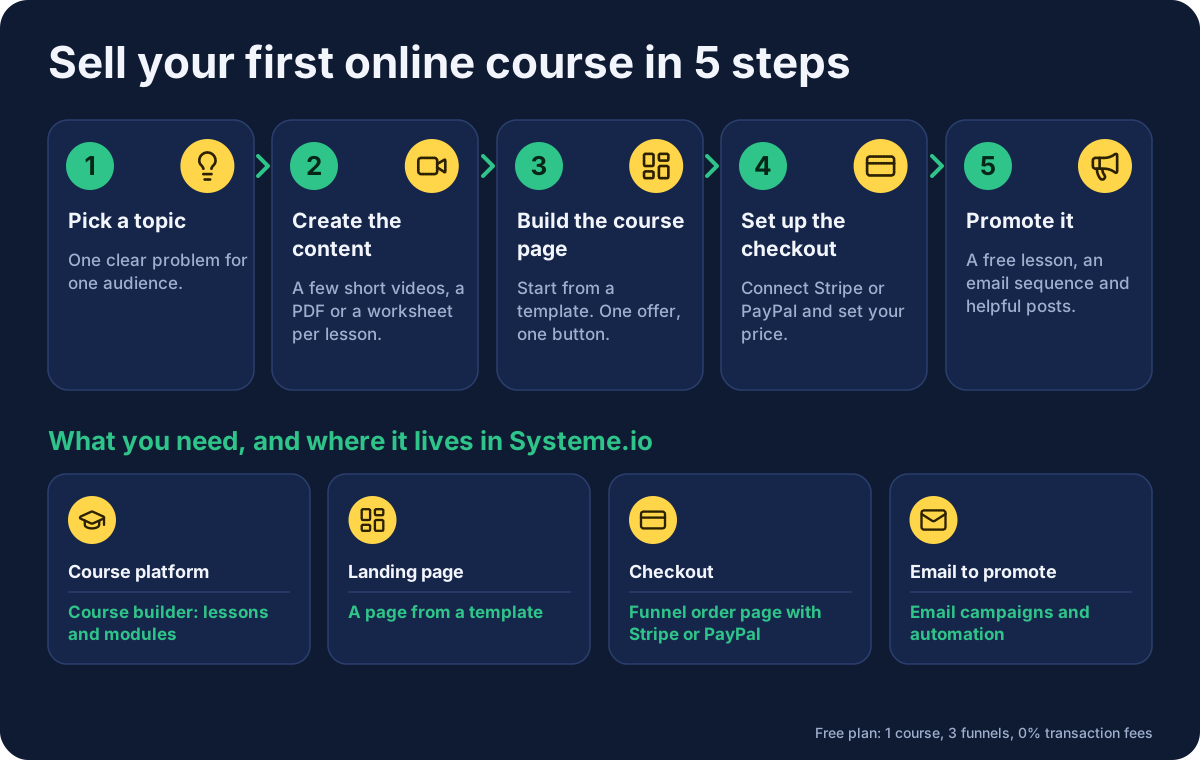
To sell your online course you need four things. Systeme.io covers all of them, so you don't have to join separate tools, and you can offer your course without any technical skills:
| You need | Where it lives in Systeme.io |
|---|---|
| A course platform | The course builder, with lessons and modules |
| A landing page | A page from a template |
| A checkout | The funnel's order page, with Stripe or PayPal |
| Email to promote your course | Email campaigns and automation |
Step 1: Pick a course topic people want
Start with the problem, not the lessons. Pick a course topic that solves one clear pain point for one audience. Alex Hormozi makes a useful point about trust in online education: a legitimate offer screens for who is a good fit and does not promise instant income. (watch) That is worth following. Say who the course is for, what they will be able to do, and do not promise results you cannot back up.
Step 2: Create your course content
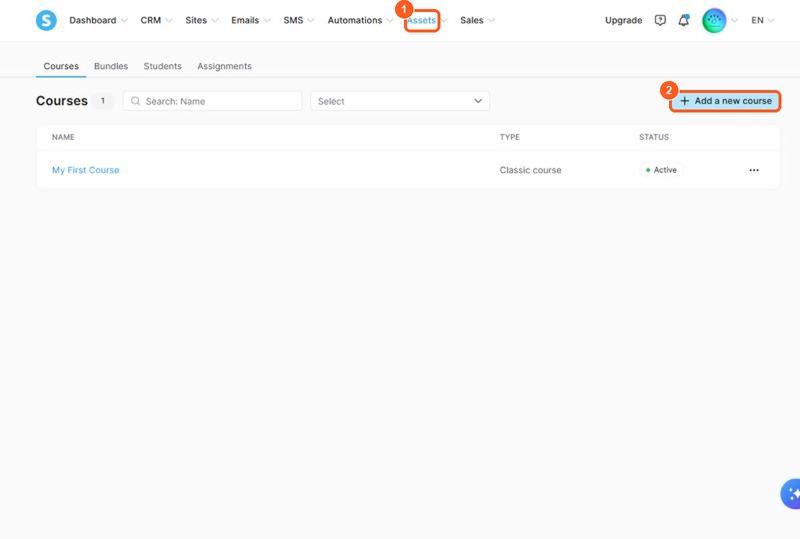
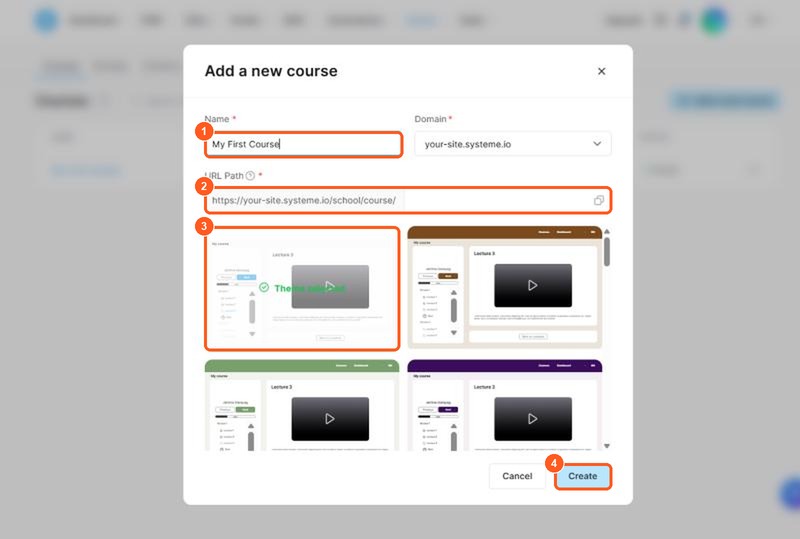
The orange numbers on the screenshots show what to click or fill in, in the same order as this list.
To create the course in Systeme.io:
-
In the top menu, open Assets and choose Courses. This is the list of your courses. The Add a new course button is at the top right.
-
Click Add a new course. A window opens. Fill it in like this:
- Name: the title students will see, for example "My First Course".
- Domain: keep the address Systeme.io gives you. It looks like
your-site.systeme.io. - URL Path: the last part of the course web address. Use short words, for example
my-first-course. - Theme: scroll down and click one of the course designs. The green tick shows the one you chose, and you can change it later.
- Click Create.
-
Open the new course, add a module and then your first lessons.
Open the course builder in your free account, add a module and add your first lessons. Keep it simple: a few short videos, a PDF or a worksheet for each lesson. Good course content is clear and finished, not perfect. You can improve the course creation later, because students see updates straight away. Reviewers say the course area looks plain, so put your effort into the lessons themselves.
Step 3: Build your course page
This page tells a visitor what the course is, who it is for and why it is worth buying. In Systeme.io you create it from a template. Pick a template from the template library, replace the text and pictures with your own, and add a testimonial once you have one. Keep one offer and one button on it, so the next step is obvious, because a clear page helps conversion.
Step 4: Set up the checkout
Connect Stripe or PayPal, set your price and add the course to the checkout page. Customers who pay get access to the course automatically. Because Systeme.io charges 0% transaction fees, the platform takes no cut of your course sale. You can also add an order bump or a one-click upsell on the checkout, such as a bonus lesson.
To connect your payment method:
- Click your profile picture at the top right, then Settings.
- In the left menu, click Payment gateways.
-
Next to Stripe, click Connect and follow the steps. If you use PayPal, connect it the same way. Once connected, it shows your Merchant ID, like
EXAMPLE1234567here.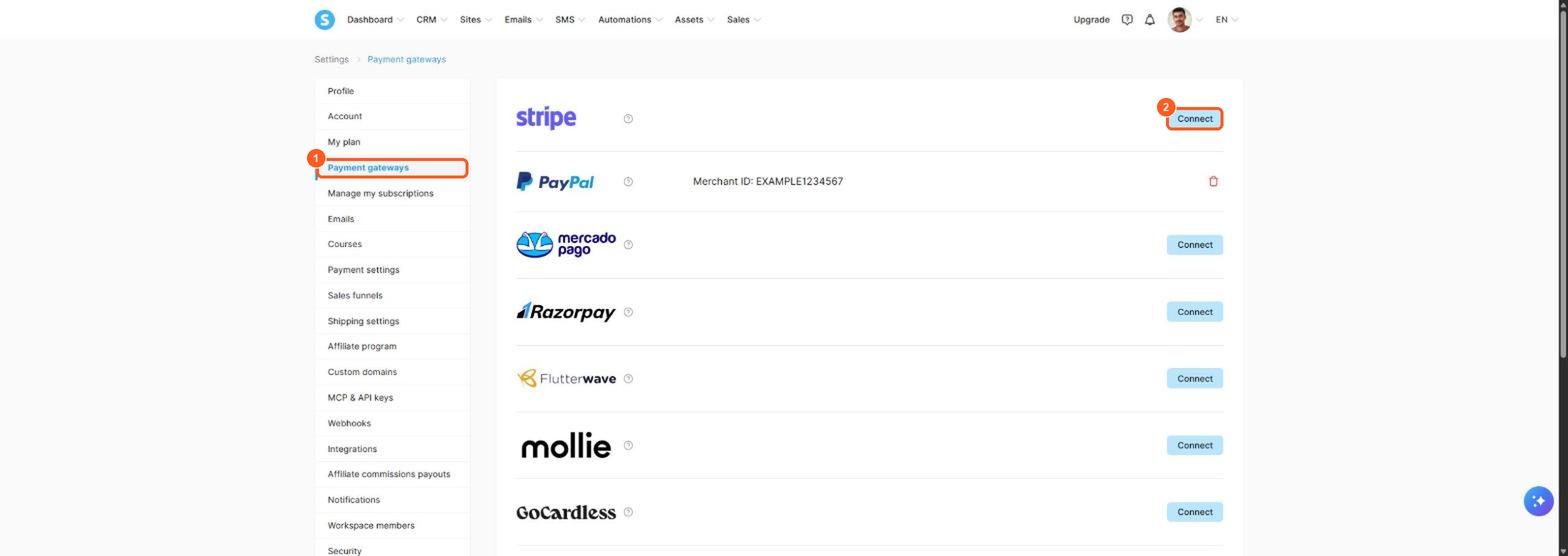
The orange numbers show the menu item (1) and the button (2). The Merchant ID in the screenshot is an example, yours will be different.
To set your price:
- Open Sites → Funnels and open your funnel. Click the Order form step (the checkout page).
- Under Choose offer type, pick Digital product.
- Select your course in the product box. Systeme.io then gives the buyer access after payment.
-
Under Price plans, click the + icon to add a price. Choose a one-time payment or a subscription, give it a name and type the amount. A one-time price of
$97looks like this.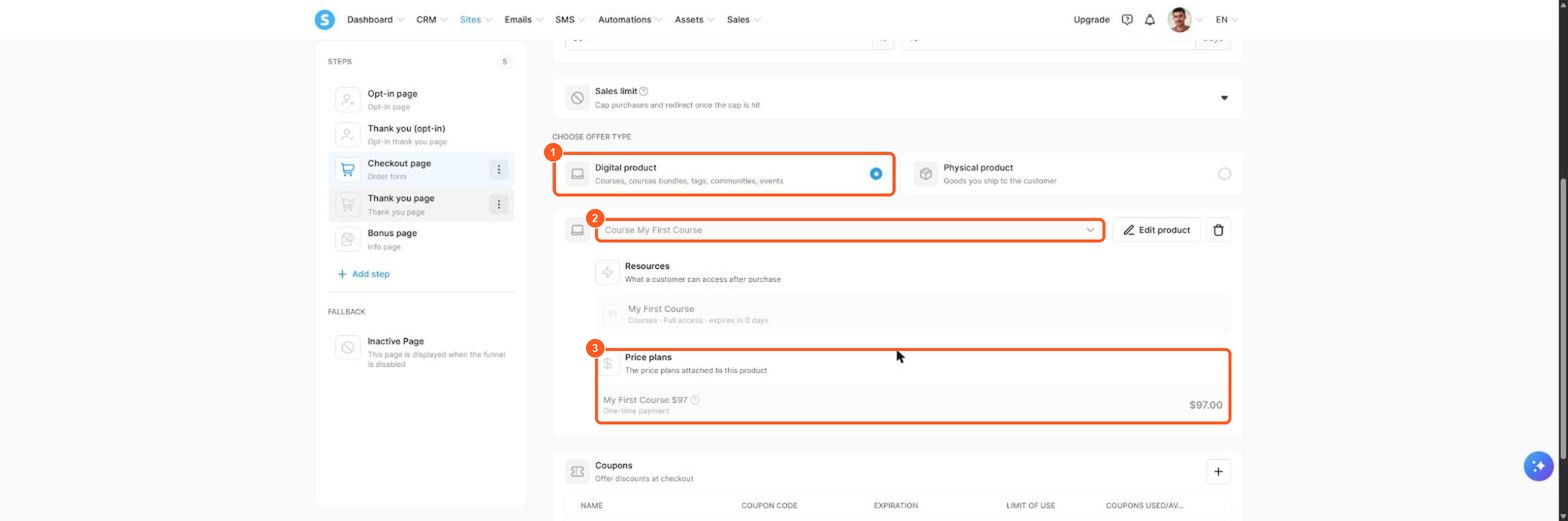
The orange numbers follow the same order as the list: offer type (1), course (2) and price plans (3).
Step 5: Promote the course and get your first students
A page does not sell itself, and online learning only works when students find it, so you need a way to bring people to it. A simple method is to offer a free lesson or checklist, collect email addresses, and send a short email sequence that ends with an invitation to join your course. Post helpful content on social media or LinkedIn and link it to your free offer. Email automation sends the follow-up for you, so you can boost your course launch while you create the next lesson.
Systeme.io vs a course marketplace
Platforms like Udemy and Skillshare are online course marketplaces with their own audience of learners. The trade-off is that you list on their platform and follow their rules, and the student belongs to them. With your own online course platform in Systeme.io, an all-in-one tool, you own the email list and set your own price. Check each marketplace's current terms before you decide, because they change. Many creators use both: a marketplace for reach, and their own page for the customers they want to keep. If you want to create online lessons that people find through search, basic SEO on your page title and description also helps, and a monthly subscription membership is an option once you have more than one course.
Courses and digital products: what else can you sell?
A course is only one kind of digital product. The same free account lets you sell an ebook, a template pack, a PDF or a video training, and you can bundle them with the course. Many creators start with one small digital course and then add digital products around it. If you teach live, the Webinar plan adds evergreen webinars, so a recorded session can sell for you on a schedule. Beginners who want to build a community around the lessons can add one of those too, though that is optional.
Mistakes to avoid when you create an online course
- Building it all before you test. Sell the idea first, then record the lessons.
- Aiming at everyone. One clear audience and one pain point sells better than a general course.
- Hiding the price. Say what it costs and what students get, in plain words.
- Forgetting email. Free access to a lesson or a free trial of your teaching style gives people a reason to join your list.
- Over-polishing. A basic course that exists beats a professional course that never launches.
When do you need to pay?
The free plan is a good start, and you will outgrow it when you want to grow. These are the limits that matter, from the pricing page:
| Plan | Courses | Funnels | Price per month |
|---|---|---|---|
| Free | 1 | 3 | $0 |
| Startup | 5 | 10 | $17 |
| Webinar | 20 | more | $47 |
The free plan also has only 1 automation rule, so a long email sequence may need Startup. See all the limits in my Systeme.io pricing guide. If you sell for a while, annual billing gives you two months free.
Start selling your first course for free
Open a free account (this is a Systeme.io affiliate link), build one lesson and one page, and see whether anyone wants it before you invest more. A simple course, sold well, is a better start than a big one that never launches.
Frequently asked questions
Can I really sell an online course for free?
Yes. The Systeme.io free plan includes 1 course with unlimited students, plus funnels, a checkout and unlimited email sends. You pay nothing to the platform, only your payment provider's fee.
Which platform is best to create and sell online courses?
It depends on your needs. Systeme.io suits beginners who want the course, page, checkout and email in one place and a free start. Course marketplaces like Udemy and Skillshare bring their own audience but set their own terms.
Do I need a website to sell my course?
No. One page inside a funnel is enough. You can add a website and a blog later in the same account.
How many courses can I sell for free?
One on the free plan. Startup allows 5 courses and Webinar allows 20, according to the pricing page.
Does Systeme.io take a cut of my course sales?
No. It charges 0% transaction fees on every plan. Your payment provider, such as Stripe or PayPal, still charges its own fee.
How do I get my first students?
Offer a free lesson or checklist in exchange for an email address, then follow up with an email sequence and invite subscribers to buy.
Sources
- Systeme.io pricing page (checked )
- Systeme.io sales funnels page (checked )
- Systeme.io template library (checked )