Prices, plans and reviews
How to Build an Email List From Scratch: Start Email Lists for Free With Systeme.io
Facts checked
Short answer
To start an email list from scratch, pick a free lead magnet, build a landing page with a signup form, send new subscribers a welcome email and share your page link. In Systeme.io you can do all of that on the free plan, which covers 2,000 contacts and unlimited email sends.
Key facts
- Cost to start
- $0, no card needed
- Contacts on free plan
- 2,000
- Email sends
- Unlimited
- Automation on free plan
- 1 rule, 1 tag
- Funnels for landing pages
- 3 on free plan
- Time to set up
- About an afternoon
Some links are affiliate links: if you upgrade to a paid plan, I may earn a commission at no extra cost to you.
How to start an email list from scratch
An email list is a group of people who gave you their email addresses because they want to hear from you. You own it. Email lists are the one audience you control, and that is why smart marketers build email lists before they chase followers. If a social media account is lost or the rules change, your mailing list is still yours, and that is why almost every online business starts one early.
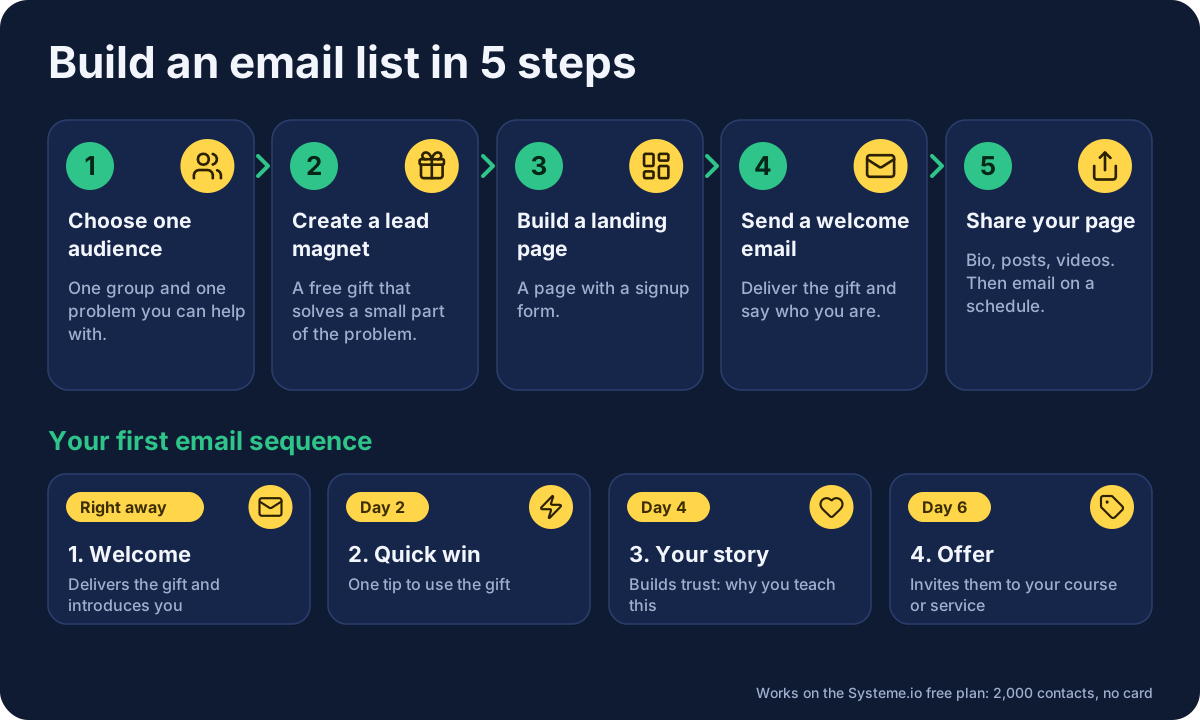
Starting an email list from scratch needs only five steps:
- Choose one audience and one problem you can help with.
- Create a lead magnet, a free gift that solves a small part of that problem.
- Build a landing page with a signup form.
- Send a welcome message to every new sign-up.
- Share your page until the list grows, then send emails on a regular schedule.
I teach this on my YouTube channel, and I do it inside Systeme.io. You don't need a paid tool to build an email list, or any free email marketing software with strict limits, because the free plan covers the whole process. Below I show the method first, then the exact way to do it in Systeme.io.
Why build an email list at all?
Social media is rented space. Your followers belong to the platform, and a post may reach only a small part of them. An email lands in a person's inbox, and the people on your list have already said yes. That makes email marketing, and a good email newsletter in particular, one of the most reliable ways to sell, announce and build trust over time.
Email also works well for a beginner because it is simple. You write one useful message, send it to people who asked for it and see who responds. You don't need a big audience or advertising. A list of 50 interested subscribers can sell a course, a service or an affiliate offer better than 5,000 passive followers.
Step 1: Decide who your email list is for
Before any tool, pick one audience. "Everyone who wants to make money online" is too wide. "Beginners who want to sell their first online course" is clear. A narrow target audience makes every later step easier: the gift, the page, the emails and the places you share it.
Write one sentence: "I help [who] to [do what]." If you cannot finish it, spend more time on this step before you build anything.
Step 2: Create a free gift people want
Nobody joins a list to "get updates". People give their email address in exchange for something useful, and that something is a gift. Good examples:
- A one-page checklist.
- A short guide or PDF.
- A video training of 10 to 20 minutes.
- A template they can copy and use.
- A short email course sent over a few days.
Make it small and specific. A "5-step checklist to publish your first funnel" beats a 100-page ebook that nobody finishes. It should be something a subscriber can use today, and it should lead naturally to what you sell later. The free gift is also the exclusive content that makes joining feel worthwhile.
Step 3: Choose an email marketing platform
You need an email marketing platform, also called an email service or email service provider, to collect addresses, store subscribers and send messages. Do not use your personal inbox: it is not built for this, and large numbers of messages from a normal address can cause email deliverability problems.
You have many options, and the free ones differ in limits. Systeme.io is an all-in-one marketing platform with a free plan that covers 2,000 contacts, unlimited email sends and landing pages in the same account. Mailchimp is an email-only tool, and according to Systeme.io's own comparison page its free plan covers 500 contacts, compared with 2,000 here. Treat that as the company's claim and check current limits before you choose.
The advantage of one platform is that your landing page, form, subscriber list, first message and later sales page all live in one place, so you don't have to connect separate tools. If you are comparing prices, my Systeme.io pricing guide lists every limit.
Step 4: Build a landing page with a signup form
A opt-in page is a single page with one job: to get a visitor to enter an email address. It has a headline, a short promise, a picture or short video and one form with a button. Marketing Island describes his favorite layout in his Systeme.io tutorial: a headline up top, a short sub-headline, a video and a button. (watch) That is all you need.
Here is how it works in Systeme.io:
- Open a free account (this is a Systeme.io affiliate link). You don't need a credit card.
-
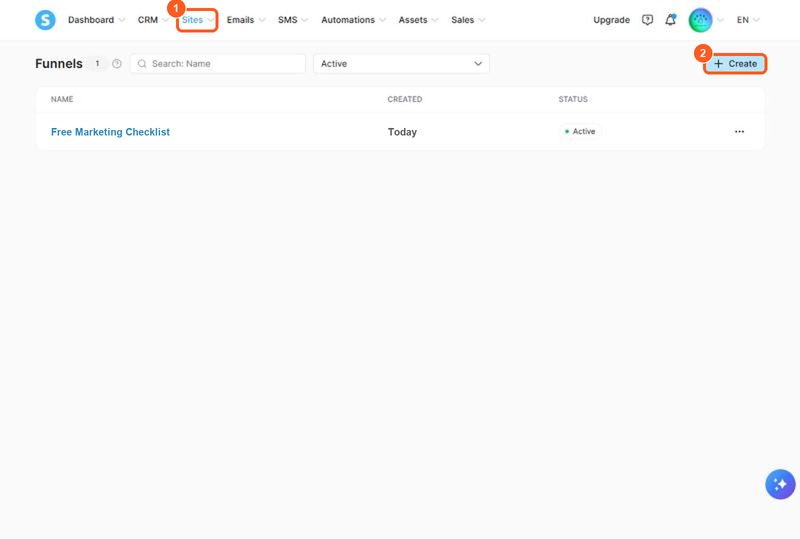
In the top menu, go to Sites and open Sales funnels. This is the list of your funnels. On a new account it is empty, and the Create button is at the top right. The orange numbers on the screenshots show what to click or fill in, in the same order as this list.
-
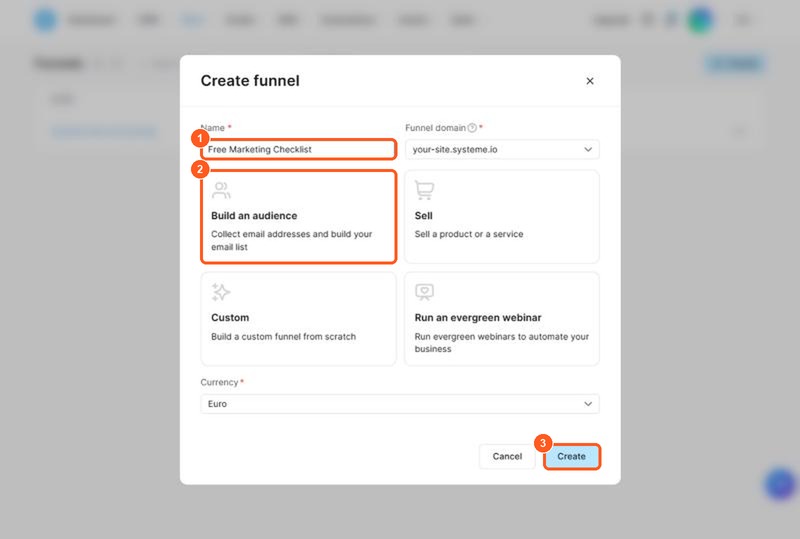
Click Create. A window called "Create funnel" opens. Fill it in like this:
- Name: anything that tells you what the funnel is for, for example "Free Marketing Checklist".
- Funnel domain: leave the address Systeme.io gives you. It looks like
your-site.systeme.io. - Goal: click the card Build an audience ("Collect email addresses and build your email list"). The other cards are Sell, Custom and Run an evergreen webinar.
- Currency: keep the default unless you sell in another one.
- Click Create at the bottom right of the window.
A funnel is a set of linked pages, and one page is enough to start. 4. Open the funnel and pick an opt-in page or opt-in template. Marketing Island notes that you don't need every step a template comes with: for a single page you can remove the extra step and keep only the page you want. 5. Click Edit page and replace the headline, text and picture with your own. Change the button text to something clear, such as "Send me the checklist". 6. Check the opt-in form. It must ask for an email address, and a first name if you want to personalize your emails. 7. Preview the page, then publish it.
Systeme.io gives each page its own web address. This is the link you will paste into your social bio, your emails and your video descriptions. If you want to see other starting points, read my guide to Systeme.io templates.
Keep the page simple. One offer, one form and no menu or distracting links. Every extra choice lowers the number of people who join.
Step 5: Set up the thank-you page and the welcome email
After someone signs up, two things should happen: they should see a thank-you page, and they should get their free gift by email.
The thank-you page can be a short message that says what to do next, such as "Check your inbox". The first message is your first email, and it has the highest open rate of any email you will send, because people expect it. Use it to:
- Deliver the gift, with a clear link.
- Say who you are in two or three sentences.
- Tell them what to expect and how often you will write.
- Ask one simple question, such as what they are working on, so they reply.
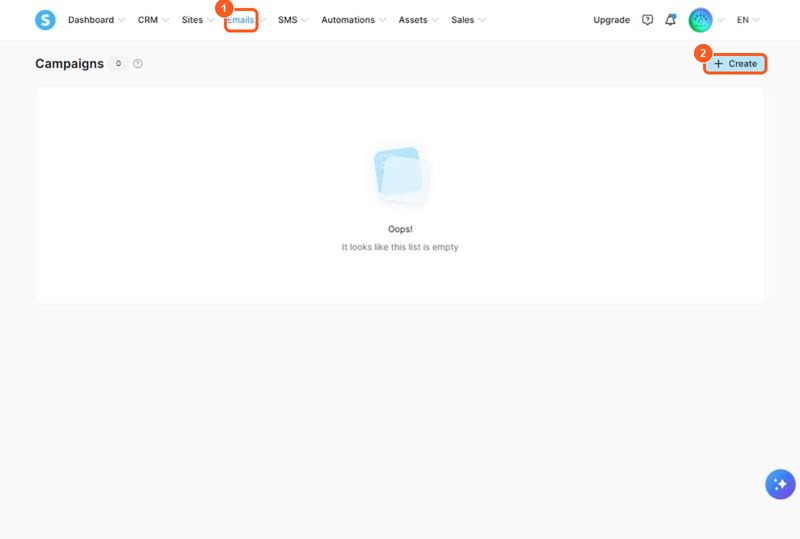
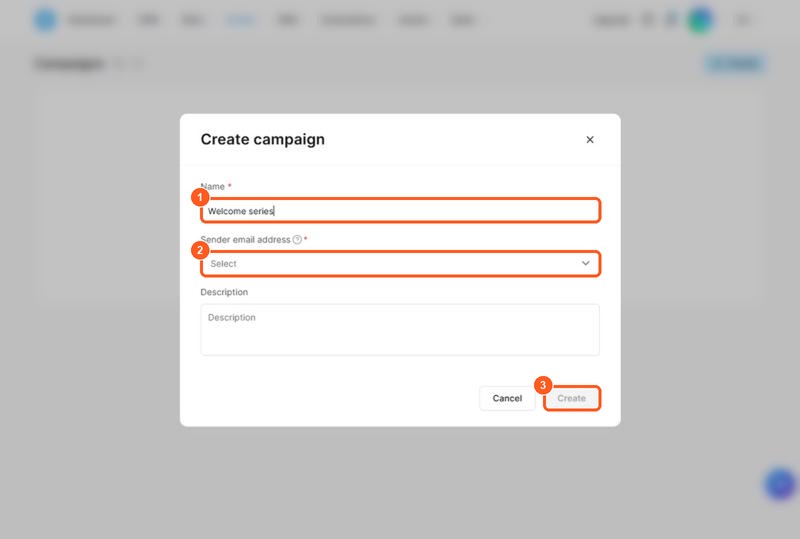
The orange numbers on the screenshots show what to click or fill in, in the same order as this list.
To create the campaign that sends your welcome email in Systeme.io:
-
In the top menu, open Emails and choose Campaigns. A campaign is a series of emails sent one after another. On a new account the list says "It looks like this list is empty".
-
Click Create at the top right. The "Create campaign" window opens. Fill it in like this:
- Name: for example "Welcome series".
- Sender email address: pick the address your subscribers will see as the sender. Use one you check, so replies reach you.
- Description: optional. A short note for yourself.
- Click Create.
-
Open the new campaign and add your first email. Write the welcome message from the list above and set it to send right away.
In Systeme.io you can add an automation rule that adds the subscriber to a campaign when they sign up through your form. The free plan allows 1 automation rule and 1 tag, which is enough to run one welcome flow. When you need more, the Startup plan raises those limits. See what the free plan includes before you rely on it.
Step 6: Write a short email sequence
One welcome message is a start, but a short email sequence works better. Send it automatically over a few days after signup. A simple structure:
| When | What it does | |
|---|---|---|
| 1. Welcome | Right away | Delivers the gift and introduces you |
| 2. Quick win | Day 2 | Gives one tip that helps them use the gift |
| 3. Your story | Day 4 | Builds trust: why you teach this |
| 4. Offer | Day 6 | Invites them to your course, service or recommendation |
Keep every email short, in plain text or with simple formatting. Write like you talk to one person. Systeme.io's email editor is basic according to reviewers, which suits this kind of plain, personal message. Write about one idea per email, and end with one clear action. These are email marketing tips that work with any platform.
Step 7: Get your first subscribers
A opt-in page does nothing until people see it. The most effective list building tactics for a beginner are simple and free:
- Put the link in your social bio. It is the single most reliable place.
- Share the free gift in posts. Show what is inside and link to the page.
- Add it to your YouTube video descriptions and mention it in the video.
- Tell people you know. Friends, past clients and your own network can be your first dozen subscribers.
- Write helpful content that ends with the free gift as the next step.
- Join communities where your audience gathers and answer questions, sharing the link only where allowed.
Do not buy a list: never buy an email list from anyone. People on it never asked to hear from you, so they ignore or report your messages, which hurts deliverability for everyone you email. The same goes for cold email to strangers. Build your own list with people who give you their address on purpose.
How often should you email your list?
Pick a schedule you can keep. Once a week is a good start for a newsletter, with extra emails when you launch something. What matters most is being consistent, so subscribers recognize your name in the inbox. Tell people in the first message what to expect, and then do it.
Avoid sending only sales messages. A good mix is three useful emails for every one that asks for a sale. Over time this builds relationships and trust, so your offers feel like help and not pressure.
Keep your list healthy
A healthy list is made of people who want your emails, and a few habits help:
- Make it easy to unsubscribe. It protects your reputation and keeps your list full of interested people.
- Look at who opens. If some subscribers never open any email for months, try a short "still want these?" message, then clean the list.
- Send from the same name every time, so people recognize you.
- Don't exaggerate in subject lines. A clear subject line works better than hype.
What to do when your list starts to grow
Once you have a few dozen subscribers, test one change at a time. Try a new headline on your page, a different gift or a new subject line, and see what gets more signups or opens. Reviewers say the platform's email analytics are simple, so keep the tests simple too and compare results over a few weeks.
When you are ready to sell, add a product and a checkout to the same account. The same list can receive an offer for a course, a service or a recommendation. If you sell a course, see how to sell an online course for free.
What the best email lists have in common
The best email lists are not the biggest. They share five habits, and you can copy them on day one.
- They are built on permission. Everyone chose to join, so email lists like this get opened and clicked.
- They promise one thing. A clear email signup form that says what subscribers get and how often tells the right people to join.
- They are welcomed properly. A great email list starts with a friendly first message and a quick win.
- They are emailed regularly. A weekly email or a steady newsletter keeps people warm.
- They are cleaned. Subscribers who never open are removed, so the numbers you watch are real.
If you want to grow your email list without a budget, focus on these five points before you spend time on tricks. Effective email lists grow slowly at first and then faster, because every new subscriber can reply, forward and share.
How to grow your list: simple strategies to build trust
Email marketing efforts work when subscribers trust you. Content marketing helps: publish one useful post, video or thread each week and end it with a way to join your email list. Strategies for building an email audience are the same for a blog, a YouTube channel or a service business: help first, ask second. Then use email automation to send the same first message to every person, so you don't repeat the work.
You can use these list builders and tactics to build relationships with subscribers:
- Answer replies personally, especially in the first weeks.
- Ask what subscribers want to learn, and make your next free gift from the answers.
- Use short email templates you can reuse, such as a welcome, a tip and a story.
- Send a simple weekly email that gives value before it sells.
Digital marketing used to need several subscriptions for forms, pages and sending. With one all-in-one platform, collect email addresses from people who visit your page, store subscribers in one place and send every email from the same account. Email lists built this way are easy to manage, and email marketing strategies are easier to test.
Mistakes beginners make when they start an email list
- No clear audience. Without one, the gift and the emails feel generic.
- A free gift that is too big. Finish something small and useful.
- Waiting for a perfect page. Publish, then improve.
- Never emailing. A list that hears from you once a year forgets you.
- Treating subscribers as numbers. Reply to messages and ask questions.
Is Systeme.io a good way to build your email list?
For a beginner, yes. You can create a page, collect addresses, store subscribers, send a welcome message and run a simple sequence in one free account. The limits are real: the free plan has 1 automation rule and 1 tag, and the email editor is basic. If you outgrow it, you can upgrade, and your list stays where it is. If you want an honest look at the whole platform, read my Systeme.io review.
To begin, open a free account (this is a Systeme.io affiliate link), build your first opt-in page and send your first first message this week.
Frequently asked questions
How do I start an email list from scratch?
Choose one audience, offer a free lead magnet, build a landing page with a signup form, send a first message to each new subscriber and share the page link wherever your audience is.
Can I build an email list for free?
Yes. The Systeme.io free plan has no time limit, needs no credit card and covers 2,000 contacts with unlimited email sends.
What is a lead magnet?
A lead magnet is a free gift, such as a checklist, a short guide or a video, that you give in exchange for an email address.
Should I buy an email list?
No. People on a bought list never asked to hear from you, so they ignore or report your emails. Build your own list from people who sign up.
How many subscribers do I need to start?
You can send your first email to a handful of people. A small list of people who want your content is worth more than a large list that does not.
How do I get my first 100 subscribers?
Share your landing page link in your social bio, in posts, in your YouTube description and with people you already know, and make the free gift specific to one problem.
Sources
- Systeme.io pricing page (checked )
- Systeme.io sales funnels page (checked )
- Systeme.io alternatives and comparison page (checked )
- Marketing Island, Systeme.io landing page tutorial (YouTube) (checked )