Start here
How to Turn Instagram and TikTok Followers Into Paying Customers
Facts checked
Short answer
Put one link in your Instagram or TikTok bio that leads to a funnel. In Systeme.io, add a Link in bio page to a funnel, then an opt-in page that collects emails and a thank-you page. Create a welcome email campaign and an automation rule that subscribes every new contact to it. Followers then join your email list, where you can sell to them, instead of staying on a platform you do not own.
Key facts
- Link in bio page
- Funnel → Add step → Type: Link in bio → choose a template → Edit page
- Funnel pieces
- Link in bio page, opt-in page, thank-you page
- Form button actions
- Submit form, show pop-up, open URL, next step URL, download file
- Optional safeguard
- Double opt-in checkbox on the form
- Follow-up
- Email campaign plus an automation rule: Subscribe to campaign
- Free plan
- Lists 3 funnels, 1 email campaign and 1 automation rule
Some links are affiliate links: if you upgrade to a paid plan, I may earn a commission at no extra cost to you.
Why a link in bio beats a bare profile
Instagram and TikTok give you one clickable link. If it points to your homepage, most visitors look and leave. If it points to a page with one clear next step, some of them join your email list, and from there you can sell to them.
I publish Systeme.io tutorials on my YouTube channel. After going through several funnel tutorials from other creators, this is the simple version I would build first.
| Piece | What it does |
|---|---|
| Link in bio page | The page your profile links to |
| Opt-in page | Collects the email, usually in exchange for a free gift |
| Thank-you page | Confirms and delivers the gift |
| Welcome emails | Follow up automatically |
Create a Systeme.io account (Systeme.io affiliate link) if you do not have one yet. You also need one free gift to offer. If you do not have one, start with my guide to creating a lead magnet.
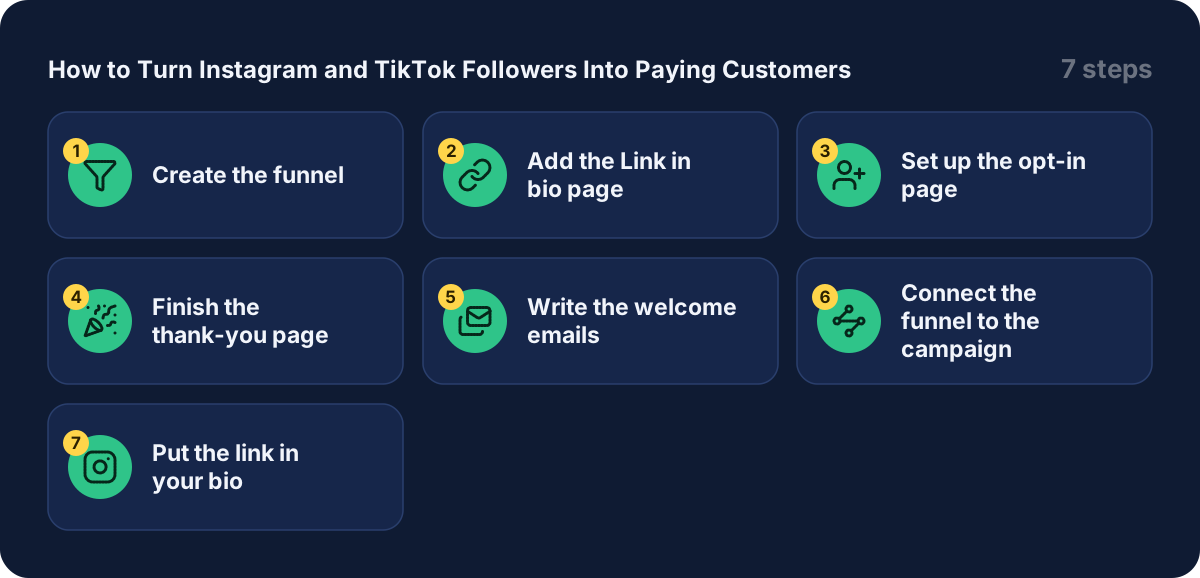
Step 1: create the funnel
Go to Sites, then Sales funnels, then Create. Name it, for example "free guide funnel". Choose the goal Build an audience, set your currency and save. Systeme.io creates two pages for you: an opt-in page and a thank-you page.
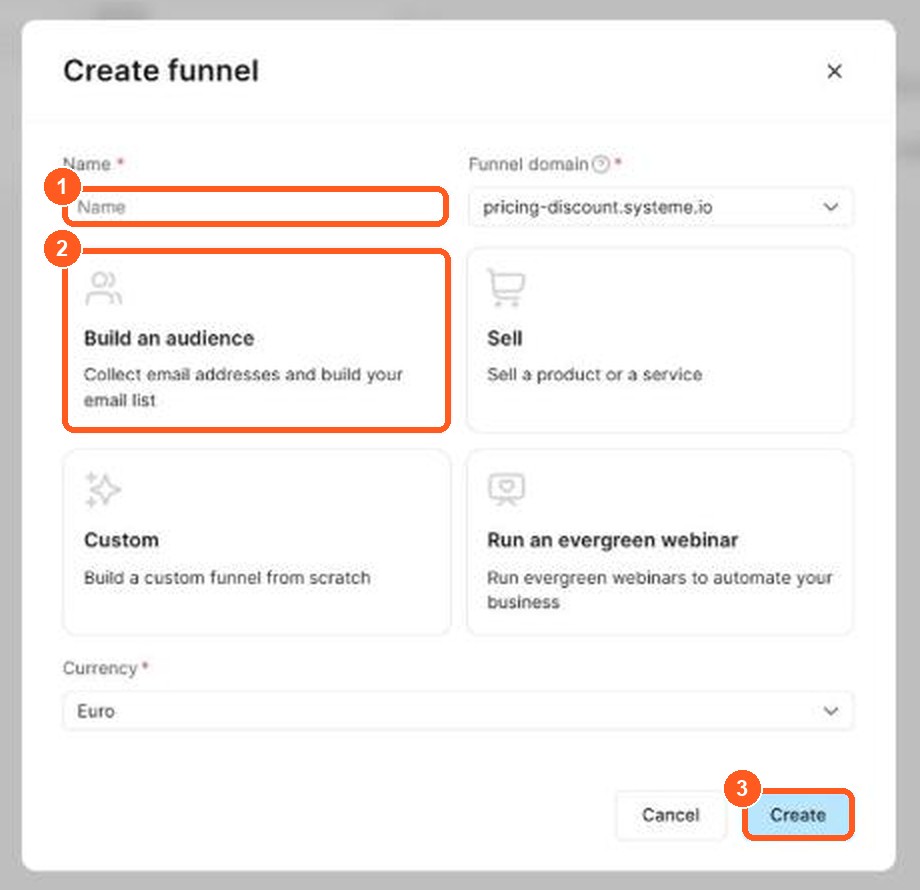
The orange numbers show what to click, in the same order as the steps.
Step 2: add the Link in bio page
Open the funnel and click Add step in the left panel. In the Type field, choose Link in bio. Pick one of the templates by clicking Select, then click Edit page to customize it. The official help page lists exactly these steps.
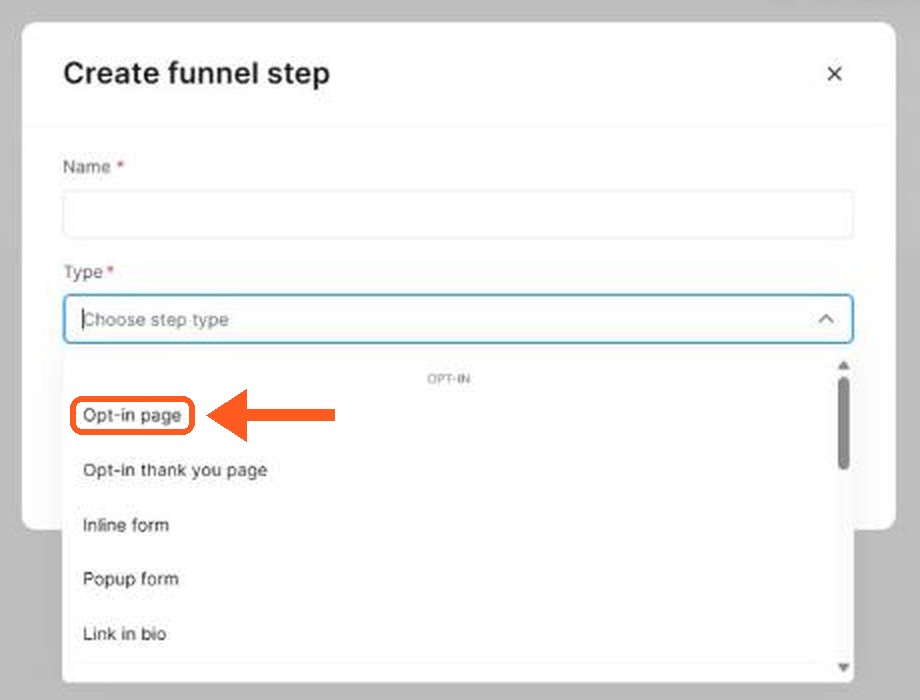
The orange arrow shows where to click.
On this page, keep the choices few. One main button to your free gift, and maybe one or two other links, is easier to act on than a long list.
Step 3: set up the opt-in page
Open the opt-in page, pick a template and click Edit page. Write a headline that says what the follower gets. Then click the button in the form and look at the action when the button is clicked. A creator I watched listed the options as submit form, show pop-up, open URL, next step URL and download file. Choose Submit form.
Next, set the redirect after sign-up to the next step, so people land on your thank-you page right after they subscribe. There is also an optional double opt-in checkbox if you want subscribers to confirm their email first. Save the page.
Step 4: finish the thank-you page
Tell people what happens next and give them the free gift here, either as a button or a link. Keep the page short. For another way to deliver files, see my guide to selling eBooks online.
Step 5: write the welcome emails
Go to Emails, then Campaigns, and create a campaign such as "welcome sequence". Add a first email that goes out right away. Welcome them, deliver the gift and say what to expect. Then add a follow-up every day or two with something useful, and later your offer. Remember to activate each email and set its delay. My guide to email automation shows the details.
Step 6: connect the funnel to the campaign
Go to Automations, then Rules, and click Create. Add the trigger Funnel step form subscribed and choose your opt-in page. Add the action Subscribe to campaign and pick your welcome campaign. Save the rule. From now on every follower who signs up gets the emails automatically.
Step 7: put the link in your bio
Copy the URL of your Link in bio page from the funnel and paste it into the website field of your Instagram or TikTok profile. Those apps handle that setting themselves, so check their own help if the field is hard to find.
Then test the whole path from your phone: open the link, sign up with a spare email address, and check the thank-you page and the first email.
What other creators say
After going through several tutorials, a few points came up again and again. In my view these are worth remembering:
- Offer one thing. A single free gift beats a menu of options.
- Check on a phone. Most followers arrive from a phone, so view every page there.
- Redirect to the thank-you page. People should see a confirmation right after signing up.
- Build the email sequence before the traffic. The welcome emails should be ready the day the first follower joins.
- Start free. The free plan is enough to build and test the first version.
I could not confirm from the pricing page how many funnels and campaigns each paid plan allows. Check the Systeme.io pricing page before you plan several funnels.
Mistakes to avoid
- Linking your homepage. Visitors get lost. Link to one clear next step.
- Forgetting the automation rule. Without it, new contacts are collected but never receive your emails.
- No free gift. Followers rarely give an email for nothing.
- Skipping the phone check. A page that looks fine on a laptop can be hard to use on a phone.
- Not testing the sign-up. One test with a spare address catches most problems.
How to convert social media followers into customers
Followers are not customers until they take an action. To convert followers, you need a clear next step and a page that makes the step easy. The conversion rate from social media followers is usually low, which is why you should not rely on likes alone.
| Stage | What the follower does | What you offer |
|---|---|---|
| Notice | Watches your post | Useful, specific content |
| Click | Taps the link in your bio | A single clear link |
| Sign up | Gives an email | A free guide or checklist |
| Buy | Purchases | An offer sent by email |
Use social proof, such as a short customer comment, to build trust. Keep creating content that answers one question at a time, and mention your free offer in every post. If few people click, change the link text or the promise, and check the result after a week to see your conversion rate. My guide to creating a lead magnet shows what to offer, and my guide to building a landing page for free shows where to send people.
Related guides
- How to create a lead magnet
- Email automation for solopreneurs
- How to build a sales funnel from scratch
- Systeme.io pricing
- Is Systeme.io really free?
Get started
Open a Systeme.io account (Systeme.io affiliate link), build your link in bio funnel and put the link in your profile this week.
Frequently asked questions
What is a link in bio page?
A single page that your Instagram or TikTok profile links to, with buttons or links to the things you want followers to open. In Systeme.io you add it as a step inside a funnel, so it sits next to your opt-in and thank-you pages.
Can I build it on the free plan?
The pricing page lists 3 funnels, 1 email campaign and 1 automation rule on the free plan, which is enough for one link in bio funnel with a welcome sequence. Check the pricing page for the current limits.
Why collect emails instead of just growing followers?
A platform can change its reach or rules, and you do not control who sees your posts. An email list is a way to reach people directly. That is the main reason creators send followers to an opt-in page.
What should the opt-in button do?
Set the button action to Submit form, and send people to the next step so they land on your thank-you page. A creator I watched also showed an optional double opt-in checkbox for confirming the email.
How do new contacts get the welcome emails?
Through an automation rule. Use the trigger Funnel step form subscribed with your opt-in page, and the action Subscribe to campaign with your welcome campaign.