Start here
How to Sell eBooks Online for Free and Keep More of Every Sale
Facts checked
Short answer
Build a sales funnel with a sales page, an order form and a thank-you page. On the order form choose Digital product, add a tag as the resource and set a price. Then create an automation rule that sends the eBook by email when a sale happens. You can also deliver it as a download link or on the thank-you page. Systeme.io lists 0% transaction fees.
Key facts
- Funnel pages
- Sales page, order form, thank-you page
- Offer type
- Digital product with a tag as the resource
- Delivery options
- Email attachment, download link, or thank-you page
- Email attachment limit
- 5 MB
- Automation trigger
- New sale
- Systeme.io transaction fees
- 0% (your payment provider still charges its own)
Some links are affiliate links: if you upgrade to a paid plan, I may earn a commission at no extra cost to you.
What you need before you start
Selling an eBook takes four pieces: the file, a page that sells it, a way to take payment and an automatic delivery. Systeme.io puts the last three in one place, so you do not need a separate store, checkout tool or email service.
I publish Systeme.io tutorials on my YouTube channel. After going through several eBook tutorials from other creators, this is the order I would follow.
| Item | Needed? |
|---|---|
| A Systeme.io account (the free plan is enough to start) | Yes |
| Your eBook as a file, usually a PDF | Yes |
| A price | Yes |
| A way to get paid, set up in your account | Yes |
Create a Systeme.io account (Systeme.io affiliate link) if you do not have one yet. If you plan to sell several kinds of files, my guide to selling digital products without Shopify covers the wider picture.
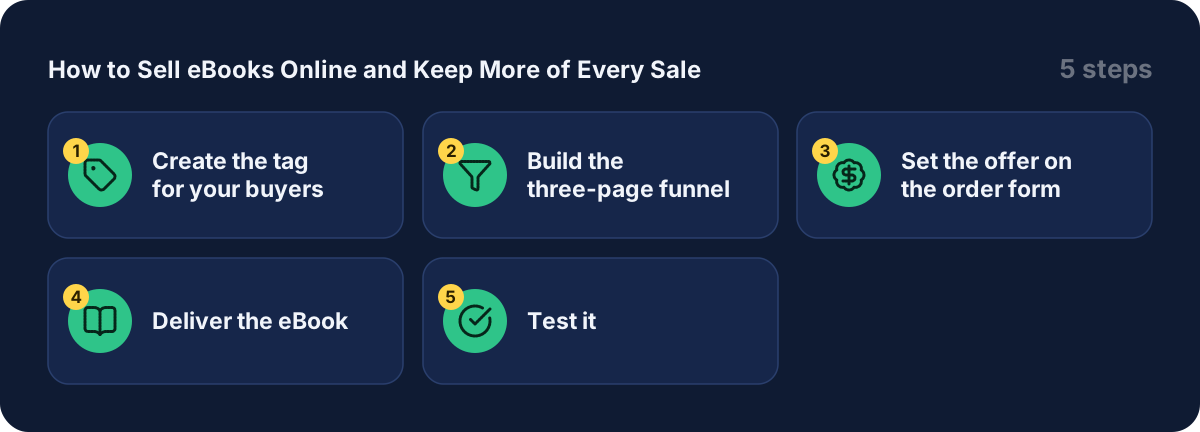
Step 1: create the tag for your buyers
Go to Contacts, then Tags, and create a tag such as "ebook buyers". The tag marks everyone who buys. It is also how Systeme.io knows what to deliver, and you can reuse it later to email these buyers again.

The orange arrow shows where to click.
Step 2: build the three-page funnel
Go to Sites, then Sales funnels, then Create. Name the funnel, choose the Sell goal and save. You start with an order form and a thank-you page. Add a step for your sales page and move it to the top.
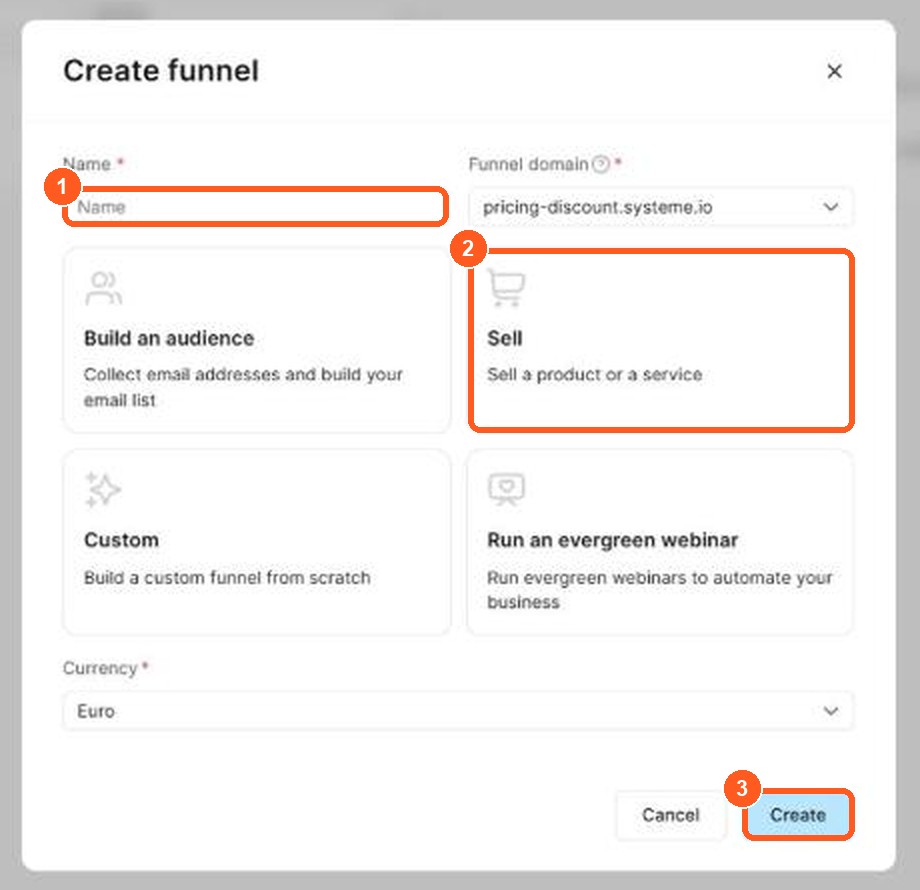
The orange numbers show what to click, in the same order as the steps.
The order is simple: the visitor reads the sales page, buys on the order form and lands on the thank-you page. Pick a template for each page and edit it. For a full walk-through, see my guide to building a sales funnel.
Step 3: set the offer on the order form
Open the order form step, choose Digital product as the offer type and click the + to create a new product. Give it a name. Then add a resource and choose Tags, and pick the tag from Step 1. Save.
Add a price plan too, because the product needs one. The help page points to a separate guide on creating and configuring a price plan.
One creator pointed out the reason for the tag. The resource list offers courses, course bundles, communities and tags, and none of them is "a file". So for an eBook, software or audio file you use a tag and let an automation rule deliver the file.
Step 4: deliver the eBook
The official help page lists three ways. Pick one.
| Method | How it works | Good for |
|---|---|---|
| Email attachment | An automation rule sends the file when a sale happens | Small files, up to 5 MB |
| Download link in the email | Upload to Google Drive, OneDrive or Dropbox and paste the link | Larger files, better deliverability |
| Link on the thank-you page | Add a direct download link to the page buyers land on | The simplest setup |
For the email method, create an automation rule with the trigger New sale, then the action Send email. Write the email, attach the file or paste the link, and save the rule. From then on every buyer gets the tag and the email.
Step 5: test it
Make a test purchase before you send any traffic. Check that the email arrives, the file opens and the thank-you page looks right. The help page recommends this too.
Add more revenue from the same buyer
An eBook is a small purchase, so it helps to offer a bigger one right after. Systeme.io lets you add an order bump on the order form and an upsell or downsell page after it. One creator I watched said roughly one in seven buyers took the upsell on his funnel, and a cheaper downsell caught a share of the rest. That is one person's result, not a promise, but it shows why a single low price leaves money unclaimed. My guide to building a sales funnel shows how.
What other creators say
After going through several tutorials and demonstrations, a few points came up again and again. In my view these are worth remembering:
- Use a tag, not a course. Creators avoid building a fake course just to deliver a PDF.
- Send a link for big files. Attachments are capped, and links keep the email light.
- Start from a template. Several creators begin with a ready-made sales page and change the text.
- Think about the upsell early. The thank-you page and the offer after the purchase are where extra revenue comes from.
- Check your email setup. Using your own domain helps your emails reach the inbox.
I could not confirm from the pricing page which plan includes order bumps and upsells. Check the Systeme.io pricing page before you design the funnel around them.
Mistakes to avoid
- Attaching a large PDF. Anything over 5 MB will not attach. Send a link instead.
- Forgetting the price plan. The product needs one before it can sell.
- Not testing. A missing file email is the most common failure, and a test purchase finds it.
- Linking the file in public. If the download link sits on a public page, anyone can find it. Use the email or the thank-you page.
- Assuming no fees at all. Systeme.io lists 0% transaction fees, but your payment provider still charges its own.
Where to sell your ebook: Kindle, marketplaces or your own online store
You can sell an ebook on a marketplace or in your own online store. Amazon Kindle (KDP) is the best-known marketplace: it brings buyers to you, but the platform sets the rules, the price options and the ebook format. Selling from your own store means you keep the customer's email, which you can use to sell your next ebook.
| Marketplace (Kindle, KDP) | Your own online store | |
|---|---|---|
| Buyers | Built-in audience | You bring them |
| Customer email | Usually not shared | You keep it |
| Ebook format | Platform's format | PDF or any file |
| Discount and bundles | Limited | Your choice |
To publish an ebook in your own store, upload your ebook file, set a price, add a payment method such as PayPal or card, and share the link. Many authors do both: they use a marketplace to find readers and a store to build an email list. Whichever you pick, a digital book has no stock and no shipping, unlike a physical book. My guide to selling digital products without Shopify covers the store side, and my guide to creating a lead magnet shows how a free sample chapter can grow your email list before you sell.
Related guides
- How to sell digital products without Shopify
- How to build a sales funnel from scratch
- How to create a lead magnet
- Systeme.io pricing
- Is Systeme.io really free?
Get started
Open a Systeme.io account (Systeme.io affiliate link), create your funnel and put your first eBook on sale this week.
Frequently asked questions
Can I sell ebooks online for free?
Yes. The Systeme.io free plan has no monthly fee and 0% transaction fees, with 3 sales funnels and 2,000 contacts (pricing page, checked October 2026). Your payment provider still takes its own fee per sale.
Can I sell an eBook with Systeme.io?
Yes. The official help page describes selling an eBook with a funnel, an order form and a delivery method. You can send the file as an email attachment, as a download link, or on the thank-you page.
What is the biggest file I can attach to the delivery email?
The official help page gives 5 MB as the maximum attachment size. For a larger file, upload it to cloud storage and put the link in the email instead.
Why use a download link instead of an attachment?
The help page says a link keeps the email small, which improves email deliverability. It works for files of any size.
Do I need a course to deliver an eBook?
No. The order form resource list focuses on courses, course bundles, communities and tags, so for an eBook you use a tag and an automation rule that sends the file.
Does Systeme.io take a cut of each sale?
The pricing page lists 0% transaction fees. Your payment provider, such as a card processor, still charges its own fees, so check theirs.
Sources
- How to sell your eBook (Systeme.io help center) (checked )
- Systeme.io pricing (checked )