Start here
How to Create a Lead Magnet for Free That Gets Signups
Facts checked

Short answer
A lead magnet is a free, useful gift you offer in exchange for an email address. Pick one small problem, make a short checklist, guide or template that solves it, then build an opt-in page to capture the email and a thank-you page to deliver the gift. Systeme.io's sales funnel page describes exactly those two steps, and its free plan includes 3 funnels and 2,000 contacts, so you can test the idea at no cost.
Key facts
- What it is
- A free gift for an email address
- Pages you need
- Opt-in page and thank-you page
- Free plan funnels
- 3
- Free plan contacts
- 2,000
- Cost
- $0 on the free plan
Some links are affiliate links: if you upgrade to a paid plan, I may earn a commission at no extra cost to you.
What is a lead magnet and how do you make one?
A lead magnet is a free gift you give in exchange for an email address. You make something small and useful, put it behind a simple page and send it to everyone who signs up. That is how most email lists start.
I show this kind of setup on my YouTube channel. I cannot promise how many people will sign up, because it depends on your audience and your offer.
What you need
| Item | Needed |
|---|---|
| One clear problem to solve | Yes |
| A short freebie (checklist, guide or template) | Yes |
| Systeme.io free account | Yes |
| Opt-in page and thank-you page | Yes |
Step 1: Pick one problem
Choose one specific problem for one type of person. "A 10-step checklist to launch your first online course" beats "Everything about online courses". The narrower the promise, the easier it is to say yes.
Step 2: Choose a format that is quick to use
Good formats are a one-page checklist, a short guide, a template or a swipe file. People should get a result in minutes. Keep it closely related to what you sell later.
Step 3: Create the freebie
Make it in any tool you like and save it as a PDF or a shareable link. Put your name and a link to your next step on the last page.
Step 4: Build the funnel
In Systeme.io, open the Sales Funnels tab and click Create. Name the funnel, then pick a funnel goal. After watching several creators' walkthroughs, the goal most of them choose for a lead magnet is Build an audience, which sets up an opt-in page and a thank-you page for you. The official help article uses Custom and Add step instead, which also works. Pick a template for each page, then open the drag-and-drop editor. My guide to building a landing page for free shows the editor in detail.
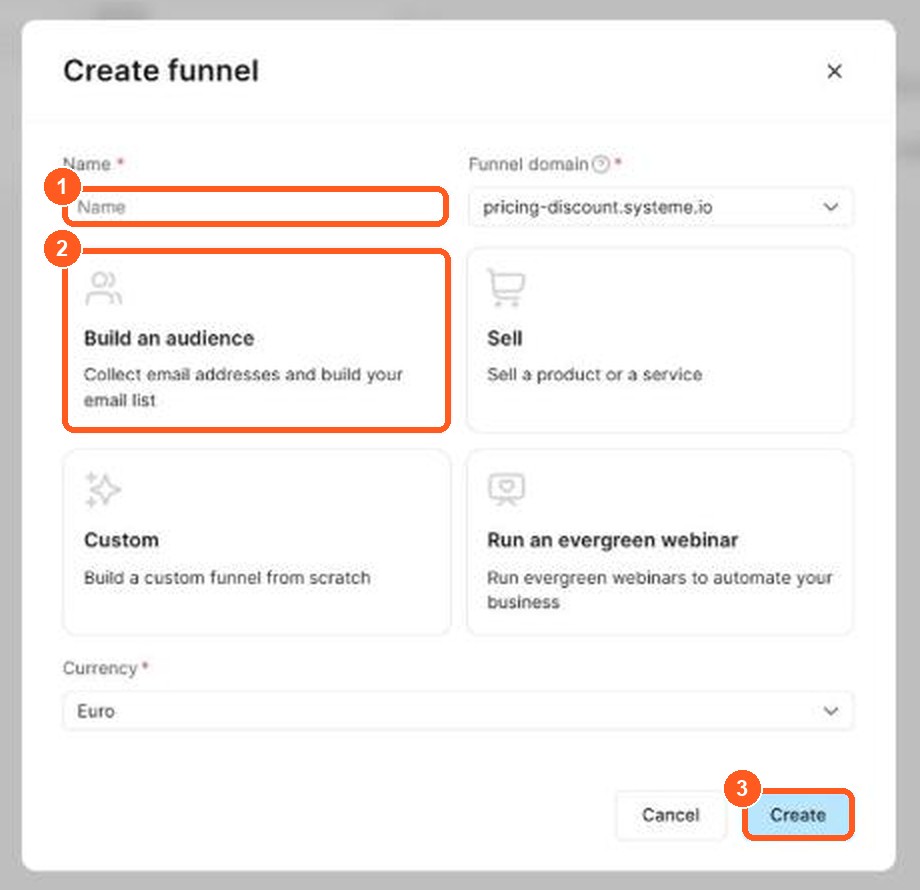
The orange numbers show what to click, in the same order as the steps.
Step 5: Set up the two pages
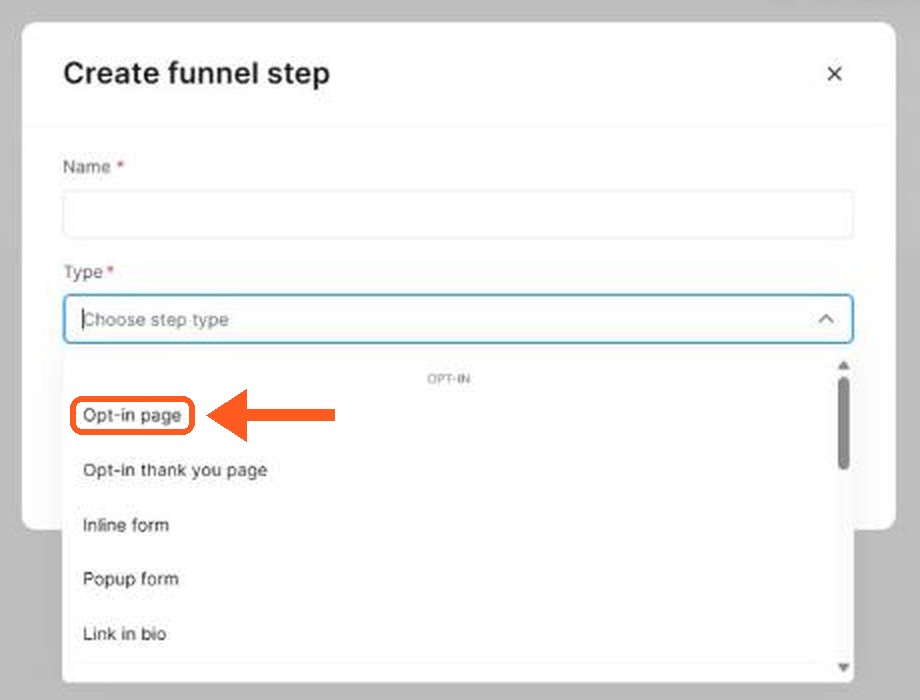
The orange arrow shows where to click.
| Page | Job |
|---|---|
| Opt-in page | Captures the visitor's email in exchange for your gift |
| Thank-you page | Delivers the gift or next step |
Put a short headline that names the result, three bullet points and one form on the opt-in page. Put the download link on the thank-you page.
Step 6: Follow up
Each page in a funnel has an automation tab. Several creators tag new subscribers there, for example with the trigger "funnel step form subscribed" and the action "add a tag", so you can tell who came from this freebie. The funnel's stats tab shows page views, opt-ins and conversion rate, so you can see whether the offer works. One creator also reports you may need to verify a sender domain in the email settings before emails send, so check that before launch.
After signup, send a short welcome message and, a few days later, an invitation to your main offer. My guide on how to start an email list covers the follow-up. Check the pricing page for automation limits, because the free plan has 1 automation rule and 1 email campaign.
Mistakes to avoid
- Giving away too much. A short freebie gets finished.
- Being vague. Name the problem and the result.
- Forgetting the next step. Tell people what to do after the gift.
- Promising results you cannot back up.
Lead magnet ideas: the best lead magnet types for your audience
A lead magnet is something valuable that you give away in exchange for a visitor's name and email. It is the simplest form of lead generation, because it turns a visitor who would have left into a subscriber you can email again. The best lead magnet is not the fanciest one. It is the one that solves a small, urgent problem for your target audience.
Here are lead magnet examples that work for many small businesses:
| Type of lead magnet | What it is | Good for |
|---|---|---|
| Checklist | A one-page list of steps | Busy people who want a quick win |
| Free PDF guide or ebook | A short guide on one topic | Coaches, consultants and creators |
| Template or swipe file | A ready-made document to copy | Marketers, designers and freelancers |
| Mini email course | Three to five short lessons sent by email | Anyone who wants to build trust over days |
| Webinar or video training | A recorded or live session | Higher-priced offers |
| Free tool or calculator | A small tool that gives a result | SaaS and software products |
| Free trial or discount | Access to the product, or a lower price | Product-based businesses |
| Quiz | A short test with a personal result | Audiences with different needs |
Pick one. Do not build five lead magnets at once. A single great lead magnet beats a library of average ones.
How to create a high-converting lead magnet
A high-converting lead magnet has four things in common. These are my own suggestions, not from the help center:
- It targets one pain point. "Grow your business" is too broad. "A 5-step checklist to write your first sales email" is specific.
- It is quick to use. People should get a result in minutes, not weeks.
- It feels valuable and is easy to understand. Give it a clear name that says what the reader gets.
- It leads to your paid offer. A lead magnet about email marketing should lead to your email course, not to something unrelated.
To create the lead magnet itself, write the content in Google Docs or Canva, export it as a PDF, and upload it where Systeme.io can deliver it. The steps above show how to deliver it on a thank-you page and in the first email.
Before you publish, ask three questions. Would I give my name and email for this? Does the title promise a clear result? Does the first page prove the content is useful, for example with a short example or a line of social proof?
What happens after someone downloads your lead magnet
A new subscriber is a potential customer, not yet a buyer. The email sequence you send next does the real work. A simple one has three emails:
- Delivery. Send the free download and say thank you.
- Help. Send a tip that builds on the lead magnet and answers a common question.
- Offer. Introduce your product or service, and explain who it is for.
My guide to email automation for solopreneurs shows how to send these emails automatically, and my guide to building a sales funnel from scratch shows where the lead magnet sits in the whole path.
How to promote your lead magnet
A lead magnet only works if people see it. Place it where your target audience already looks:
- On your blog. Add a sign-up form to your best posts. My guide to starting a blog that sells shows how to add a form to a blog page.
- On social media. Mention it in your bio and link to the sign-up page.
- In your email signature. It costs nothing and reaches people who already know you.
- At the end of a video. Tell viewers what they get and where to click.
Check the numbers after a week. If many people visit the page but few sign up, change the title or the promise. If many people sign up but few open your emails, change the lead magnet or the subject lines.
Related guides
Build your first lead magnet funnel
Open a free account (this is a Systeme.io affiliate link), build the two pages and test your freebie with a few real people.
Frequently asked questions
Can I create a lead magnet for free?
Yes. You can make the freebie with free tools, and the Systeme.io free plan covers the opt-in page, the thank-you page and the delivery email: 3 funnels, 2,000 contacts and unlimited emails (pricing page, checked October 2026).
What is a lead magnet?
A free resource, such as a checklist, short guide or template, that you give in exchange for an email address.
What makes a lead magnet convert?
It solves one specific problem quickly, it is easy to use in minutes, and it is closely related to what you sell. I cannot promise a conversion rate, because it depends on your audience.
Where do I deliver the file?
The official funnel page describes the thank-you page as the step that delivers the product or next step, so that is the simplest place for the download link.
Do I need a paid plan?
No. The free plan includes 3 funnels, 2,000 contacts and unlimited emailing. Check the pricing page for the other limits.
How long should it be?
Short. A one-page checklist often works better than a long ebook because people finish it.