Start here
Email Automation for Small Business and Solopreneurs: A Simple Free Setup Guide
Facts checked
Short answer
Email automation in Systeme.io has two parts. First build a campaign, which is a series of emails with a delay between each. Then create an automation rule that puts people into it, for example when they subscribe through a form, buy something or receive a tag. After that, every new contact gets the sequence without you sending anything by hand.
Key facts
- Part 1
- Emails → Campaigns → Create, then add and activate each email
- Part 2
- Automations → Rules → Create, trigger plus action
- Common triggers
- Funnel step form subscribed, New sale, Tag added
- Action that starts the sequence
- Subscribe to campaign
- Email timing
- Delay counted from the previous email, optional time and weekday
- Editors
- Classic editor or visual editor
Some links are affiliate links: if you upgrade to a paid plan, I may earn a commission at no extra cost to you.
What email automation means for a one-person business
When you work alone, you cannot write to every new subscriber by hand. Email automation does it for you: someone joins your list, and a series of emails you wrote once goes out on a schedule. In Systeme.io the pieces are a campaign (the emails) and an automation rule (who gets them).
I publish Systeme.io tutorials on my YouTube channel. After going through several beginner tutorials from other creators, this is the simplest setup I would start with.
| Item | Needed? |
|---|---|
| A Systeme.io account (the free plan lists one campaign and one rule) | Yes |
| A way for people to join, such as an opt-in page | Yes |
| Three to five emails written in advance | Yes |
| A sender address on your own domain | Strongly recommended |
Create a Systeme.io account (Systeme.io affiliate link) if you do not have one yet. If you do not have a sign-up page yet, build one first with my guide to creating a lead magnet.
Email marketing automation: what it is and why a small business uses it
Email marketing automation is software that sends marketing emails for you when something happens, such as a sign-up, a purchase or a tag being added. Instead of sending every email by hand, you build automation flows once. The email marketing software watches for the trigger, waits for the delay you set and sends the right email. That is why it suits a small business, where one person does the marketing, the selling and the support.
A newsletter and an automated campaign do different jobs. A newsletter goes to your whole list on a day you pick. An automated campaign starts for each person at their own sign-up moment, so everyone gets the same welcome emails in the same order. Many small businesses use both: automation for new subscribers, and a newsletter for news.
For a beginner, the features that matter are simple: an email builder that is easy to use, a clear way to build workflow automation, a free plan or free trial, and plenty of email sends. Advanced automation, such as behavior-based automation with many branches, helps larger teams, but you do not need it for a first email marketing campaign.
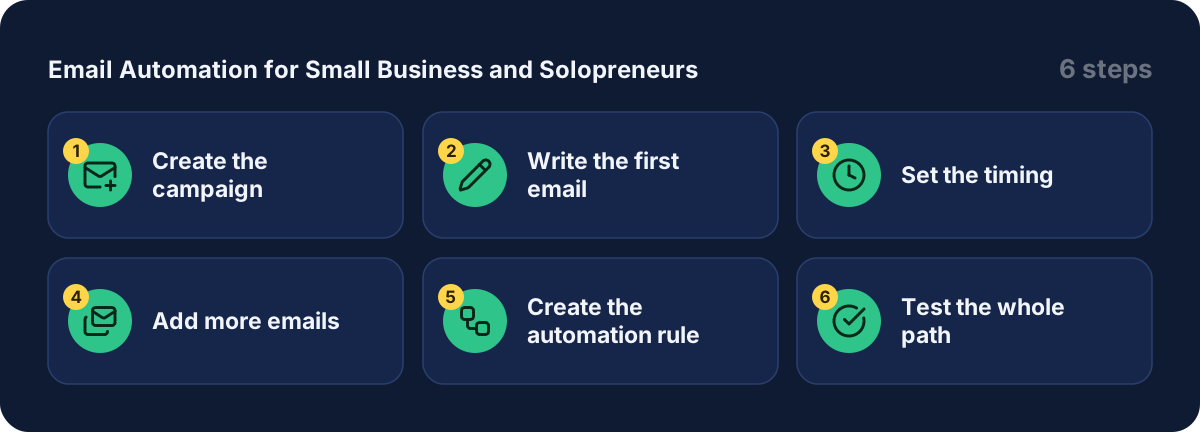
Step 1: create the campaign
Go to Emails, then Campaigns, and click Create. Enter a name such as "welcome sequence", choose the sender email address and add a short description. Save.
Step 2: write the first email
Open the campaign and click Create. Fill in the subject, the sender name, the sender address, the editor type and a template. You have two editors:
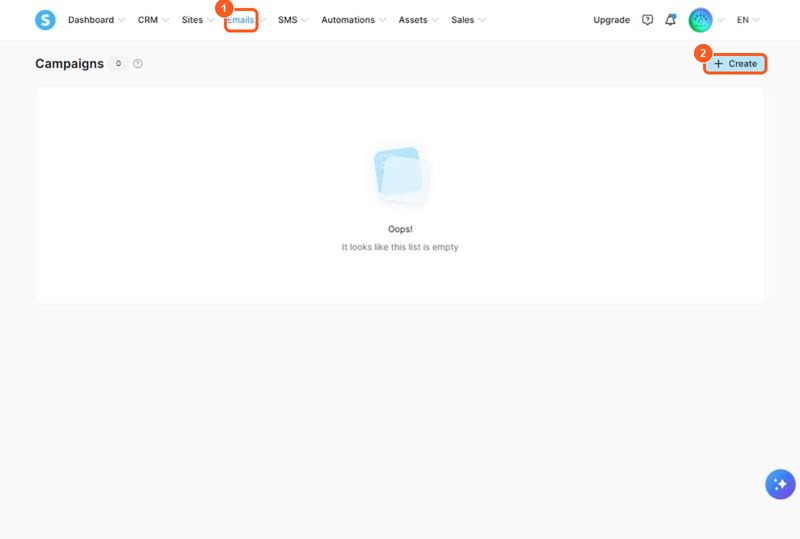
The orange numbers show what to click, in the same order as the steps.
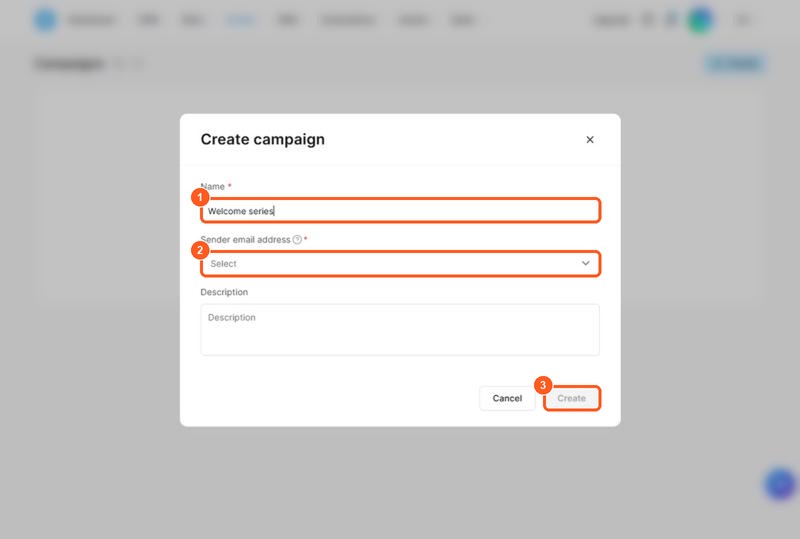
The orange numbers show what to click, in the same order as the steps.
| Editor | Good for |
|---|---|
| Classic editor | Simple text emails |
| Visual editor | Drag-and-drop layouts with images, buttons, sections and columns |
Pick one before you start writing. The help page warns that if you switch editors midway, the content you worked on is lost. In the classic editor you can add an attachment and substitute variables that fill in details such as the contact's name. Click Save and test to send yourself a copy.
Step 3: set the timing
A saved email does not send until you activate it. In the campaign list click the three dots next to the email, then Activate. A window asks you to set:
- This email will be sent after: the email that comes right before it. This sets the order.
- Delay: how long to wait after that previous email was delivered.
- Time and days of the week: optional limits, for example weekdays only.
A good starter plan is a welcome email right away, a second email a day later, and a third three days after that. The help page recommends not stacking several time conditions on one email, because all of them must be met before it sends and the result gets confusing.
Step 4: add more emails
Repeat Steps 2 and 3 for each email. The order runs from top to bottom, but a new email that you have not activated yet appears at the top of the list in grey. That is normal: it moves into place once you set its timing.
Step 5: create the automation rule
The campaign is ready, but nobody is in it yet. Go to Automations, then Rules, and click Create. Click the + next to Trigger and choose the event that starts the sequence:
| Trigger | Use it when |
|---|---|
| Funnel step form subscribed | People join through an opt-in page, form or popup. Then pick the page |
| New sale | You want buyers to get a follow-up series |
| Tag added | You tag contacts yourself, or another rule tags them |
Then click the + next to Action, choose Subscribe to campaign, select your campaign and click Save rule. A creator I watched built exactly this on the free plan: a lead-generation funnel, a welcome campaign, and one rule that subscribes new contacts to it.
Step 6: test the whole path
Sign up through your own page using a spare email address. Check that the first email arrives and that the timing of the next ones looks right. Do this before you send traffic.
What other creators say
After going through several tutorials, a few points came up again and again. In my view these are worth remembering:
- Build the campaign first, then the rule. The rule needs a campaign to point to.
- Keep the first sequence short. A few good emails beat a long one you never finish.
- Use your own domain for the sender. A default system address can end up in spam.
- Keep emails light. The help page notes that heavy HTML can hurt deliverability.
- Let the rule do the work. If you add people by tag, set up the rule before you tag them.
I could not confirm from the pricing page how many campaigns and rules each paid plan allows. Check the Systeme.io pricing page before you plan several sequences.
Mistakes to avoid
- Tagging contacts before the rule exists. The help page says the tag must be added after the rule is set.
- Forgetting to activate each email. A saved but inactive email never sends.
- Expecting late additions to reach everyone. A new email only goes to contacts who have not reached that step yet.
- Stacking time conditions. A delay, a weekday and an hour must all be met, so a message can wait longer than you expect.
- Skipping the test. One sign-up with a spare address catches most mistakes.
Choosing the right email automation tool: Systeme.io, Mailchimp or another platform
Email marketing automation means your software sends the right email at the right time without you doing it by hand. For a small business or a one-person business, the best email automation tool is the one you will actually use. Compare these points before you choose an email marketing platform or email marketing software, whether it is Systeme.io, Mailchimp or another automation platform. Marketing tools differ in price, in automation features and in how easy the automation builder is:
| What to check | Why it matters |
|---|---|
| Free plan limits | Shows how far you can go before paying |
| Automation workflows and rules | Lets you send emails after a sign-up, a purchase or a tag |
| Email templates | Saves time when you write your campaigns |
| Contacts limit | Your email list will grow |
| Transactional email | Order receipts and login emails |
| Everything in one place | A page, a list and a store in one tool means fewer connections to break |
I have not tested every tool, so check each pricing page. Systeme.io's free plan includes 2,000 contacts, 1 automation rule and 1 email campaign, and paid plans raise those limits.
Email marketing strategies you can automate
The best marketing strategies for a solopreneur are simple. Automate these four email sequences first:
- Welcome sequence. Introduce yourself and deliver the lead magnet.
- Nurture sequence. Send helpful tips that build trust.
- Sales sequence. Offer your product to people who have been reading.
- Abandoned-cart or follow-up email. Remind people who did not finish.
My guide to creating a lead magnet shows what to give away, and my guide to building a sales funnel from scratch shows where each email sits.
Examples of automated emails for your email marketing campaigns
If you are not sure what to write, start from these examples of automated emails. A welcome email delivers the lead magnet. A quick-win email, two days later, gives one tip to use it. A story email builds trust by explaining why you teach this. An offer email invites people to your product. Each one is a marketing email that sends itself, so your marketing campaigns keep working while you serve customers.
Use the contact's name where you can, because a personalized email feels more human than a generic message. Keep the emails short, check email deliverability by testing with a spare address, and send from your own domain.
Related guides
- How to create a lead magnet
- How to build a sales funnel from scratch
- How to sell eBooks online
- Systeme.io pricing
- Is Systeme.io really free?
Get started
Open a Systeme.io account (Systeme.io affiliate link), write your first three emails and set up your welcome sequence this week.
Frequently asked questions
What is the difference between a campaign and an automation rule?
A campaign holds the emails and their timing. An automation rule decides who enters the campaign. You need both: the campaign does nothing until a rule enrolls contacts in it.
How does the delay between emails work?
Each email is sent after the email you choose in the activation window, once the delay has passed. The delay is counted from when that previous email was delivered, not from when the contact joined.
Will a new email reach people who are already in the campaign?
Not if they have already passed that step. The official help page says a new email placed earlier in the campaign is only sent to contacts who have not yet reached it.
Why is my tag-based rule not working?
The help page notes that the tag must be added to contacts after the rule has been set. Contacts who already had the tag before you saved the rule are not picked up.
Is there free email marketing for small business?
Yes. The Systeme.io free plan includes up to 2,000 contacts, unlimited emails and newsletters, 1 email campaign and 1 automation rule (pricing page, checked October 2026). That fits one welcome sequence. More sequences need a paid plan.