Start here
How to Build a Landing Page for Free (No Coding)
Facts checked
Short answer
You can build a landing page for free on the Systeme.io free plan, which allows up to 3 funnels. Create a funnel, add a step, pick a template, edit the text and pictures in the drag-and-drop editor, save, and share the page link. No coding is needed. Paid plans only matter when you need more funnels.
Key facts
- Cost
- $0 on the free plan
- Funnels on the free plan
- 3
- Editor
- Drag and drop, no coding
- Custom domains on the free plan
- 1
- Templates
- Available for lead magnets, launches, webinars, tripwires and membership sites
Some links are affiliate links: if you upgrade to a paid plan, I may earn a commission at no extra cost to you.
Can you build a landing page for free?
Yes. A landing page is one page with one goal, such as collecting an email address or selling one product. In Systeme.io it is one step inside a funnel, and the funnel builder is available on every plan, including the free plan with up to 3 funnels. You do not need to write code.
I use Systeme.io for my own business and show beginners how to start on my YouTube channel. For a first landing page, the free plan is enough to learn the whole process before you spend anything.
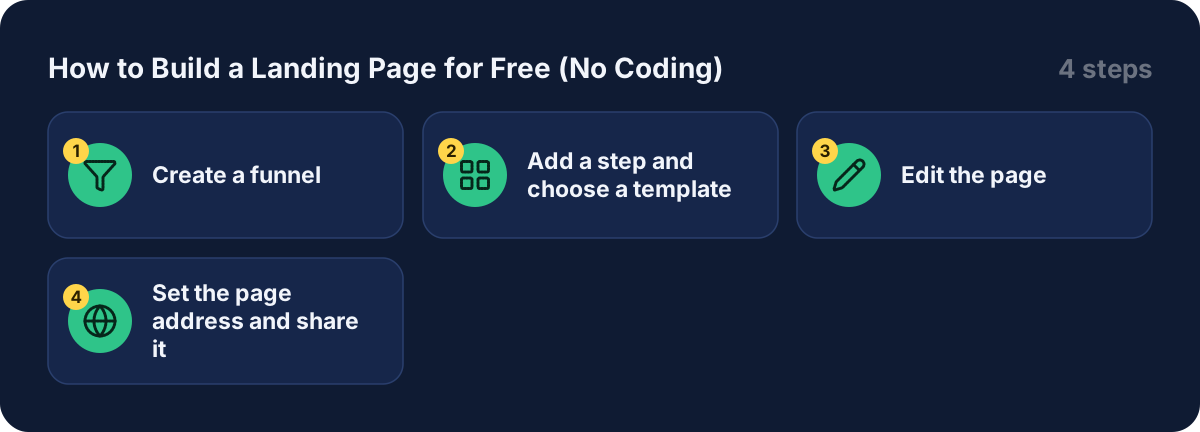
Step 1: Create a funnel
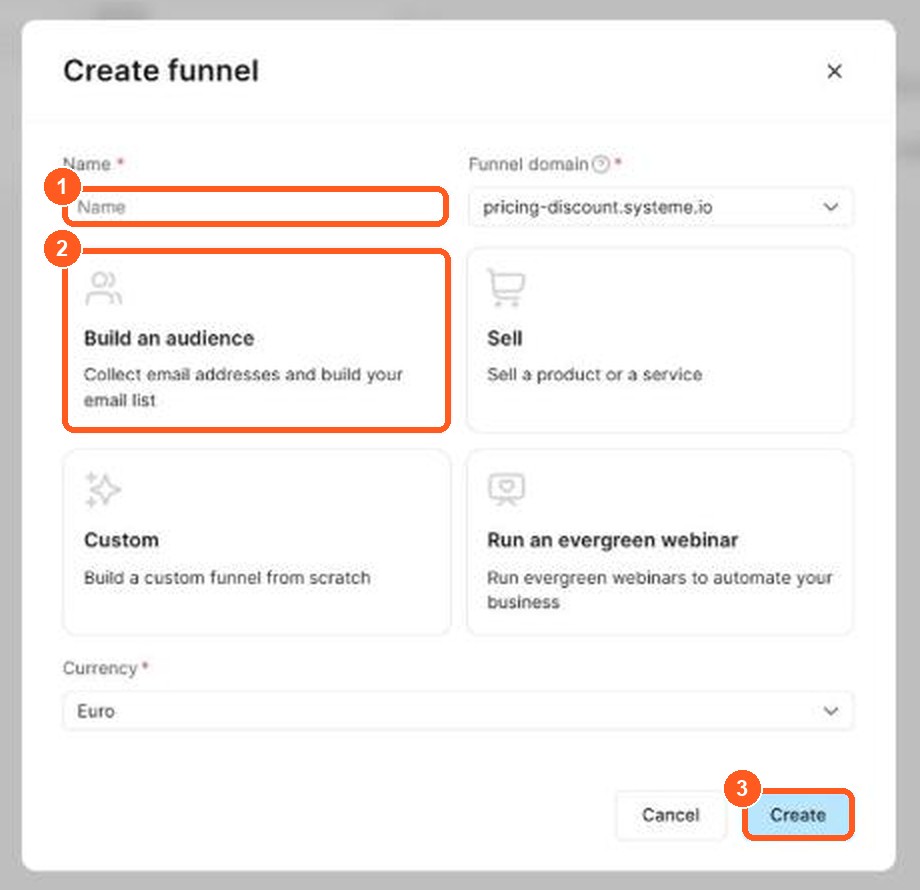
The orange numbers show what to click, in the same order as the steps.
- In your account, go to Sales Funnels and click Create.
- Choose Custom and click Save.
- Name your funnel, pick the funnel type and the currency, then click Create.
Step 2: Add a step and choose a template
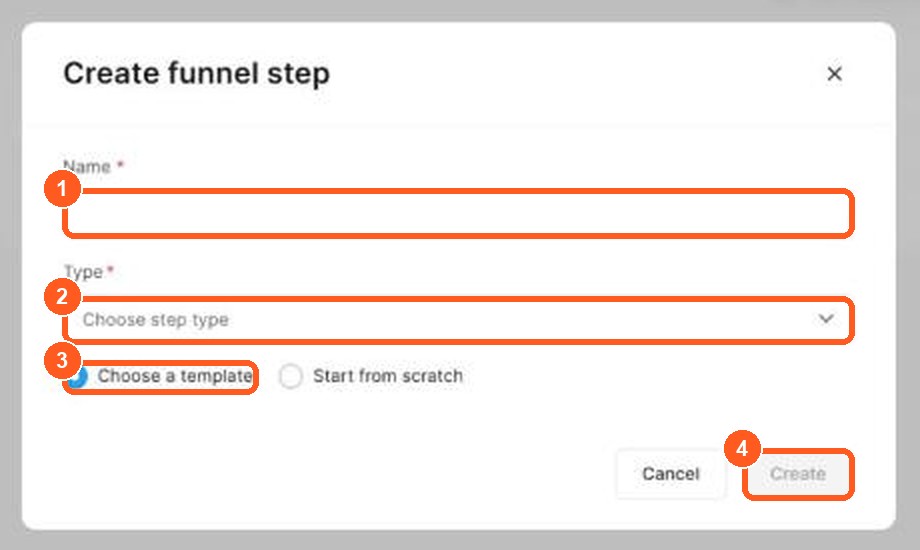
The orange numbers show what to click, in the same order as the steps.
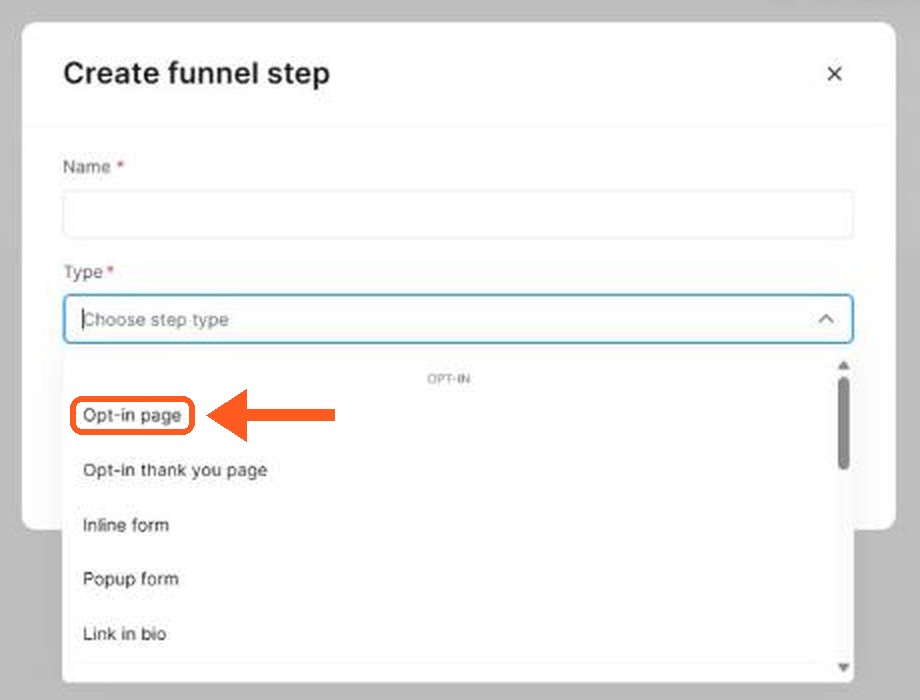
The orange arrow shows where to click.
- Inside the funnel, click Add step.
- Type a name for the page and choose the page type, then save.
- Choose a template from the designs offered, or start from scratch. The sales funnels page says templates exist for lead magnets, product launches, webinars, tripwires and membership sites, so look for the one closest to your goal. You can also browse my template guide.
Step 3: Edit the page
- In the step settings, click Edit page.
- In the editor, insert elements such as text, images and video into your columns. Use the toolbar to add sections and rows. You can add as many sections as you want.
- Replace the template text with your own. Keep one goal and one button, so the visitor knows what to do next.
- Click Save changes at the top right to return to your funnel dashboard.
Step 4: Set the page address and share it
- In the step settings, find URL Path. Replace the automatic text with something short and clean.
- Click View funnel step to open the live page in a new tab and check it.
- Share the link on social media, in your bio or in an email.
The free plan lists 1 custom domain, so you can put the page on your own address later. Follow the help center for the current domain steps.
What makes a landing page work
- One goal. One offer, one button.
- A clear headline. Say who it is for and what they get.
- Few distractions. Remove menus and extra links.
- A simple next step. An email field or a buy button, not both.
Free landing page builders: how to choose the best landing page builder
A landing page is a single page with one goal, such as collecting an email or selling one product. Landing page builders let you create landing pages without code, using a page editor and a landing page template. Many offer a free plan, but the limits differ, so compare these points before you pick the best free landing page builder:
| What to check | Why it matters |
|---|---|
| How many landing pages the free plan allows | Some tools limit you to one or a few |
| Landing page templates | A good template saves hours of landing page design |
| Email marketing included | You can send emails to the people who sign up |
| Custom domain | Often a paid feature |
| Analytics | Needed to see which landing page converts |
With Systeme.io, the free plan lets you create up to 3 funnels, and each funnel can contain landing pages. It also includes email marketing, so the landing page and the email list live in the same place. I have not compared every other landing page builder in detail, so check each tool's own pricing page.
How to create a landing page that converts
A simple landing page works best. A basic landing page needs five parts:
- A clear headline that says what the visitor gets.
- One short paragraph explaining the benefit.
- One form or one button. Do not add many links, because they pull attention away.
- Proof, such as a short testimonial or a number.
- A thank-you page that confirms the sign-up and tells people what happens next.
Test your landing page on a phone first, because many visitors will open it there. You can add Google Analytics or another tool later to see how many people visit and sign up.
Landing page without a website
You do not need a website to use a landing page. A landing page works as a stand-alone page: you share its link in your social media bio, in a video description or in an email. This is why a free landing page is a good first step for a new business. My guide to creating a lead magnet shows what to offer on the page, and my guide to building a sales funnel from scratch shows how the page fits into the whole path.
Free plan limits to know
| Plan | Funnels | Price per month |
|---|---|---|
| Free | 3 | $0 |
| Startup | 10 | $17 |
| Webinar | 50 | $47 |
| Unlimited | Unlimited | $97 |
Every limit is in my Systeme.io pricing guide, and the full free list is in Is Systeme.io really free? If your page leads to a product, read how to sell digital products without Shopify.
Build your first landing page now
Open a free account (this is a Systeme.io affiliate link), pick a template and publish one simple page today. You can improve it after you see how visitors react.
Frequently asked questions
Can I build a landing page for free?
Yes. The funnel builder is available on all plans including the free plan, which allows up to 3 funnels. A landing page is one step in a funnel.
Do I need to know how to code?
No. The editor is drag and drop. You insert elements such as text, images and video into columns and sections.
Can I start from a template?
Yes. After you name the step, you can pick a template and customize it, or start from scratch.
Can I use my own domain on the free plan?
The pricing page lists 1 custom domain on the free plan. Check the help center for the current setup steps.
When would I need to pay?
When you need more than 3 funnels, or more courses and automation rules. Startup allows 10 funnels at $17 a month.